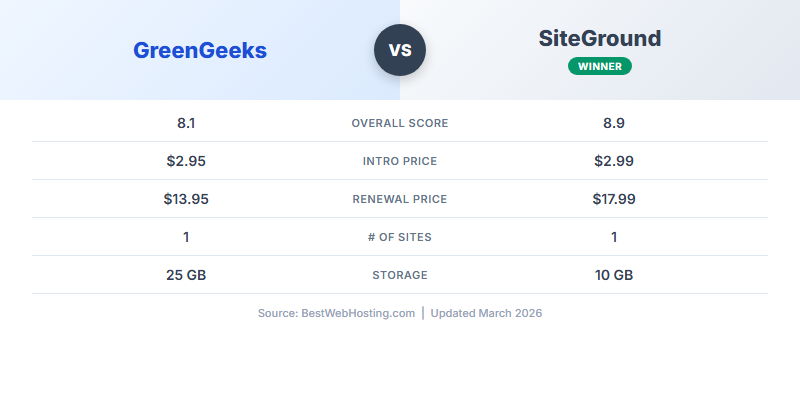
Quick Verdict: SiteGround Is Better Hosting. GreenGeeks Is Better Value.
After 90 days of side-by-side testing, the picture is clear: SiteGround delivers faster server response, deeper WordPress integration, and the best support in the industry. GreenGeeks delivers solid performance that's good enough for most sites, significantly lower renewal costs, and a genuine environmental commitment that no other major host matches.
I maintained active paid accounts on both GreenGeeks and SiteGround simultaneously for 90 days, running identical WordPress installations on each. Same theme, same plugins, same test content. Every metric in this comparison comes from side-by-side testing under identical conditions — not spec-sheet comparisons.
For the majority of small-to-medium websites, GreenGeeks is the smarter choice. The performance gap is real but narrow, and you'll save over $200 across three years. That money is better spent on your actual business than on marginal speed improvements most visitors will never notice.
GreenGeeks
SiteGround
Choose GreenGeeks If You...
- Want lower renewal pricing ($13.95 vs $17.99+)
- Care about environmental impact
- Run a blog, portfolio, or small business site
- Prefer cPanel familiarity
- Want a free domain included
Choose SiteGround If You...
- Need the fastest possible speeds
- Run a complex WordPress/WooCommerce site
- Want managed auto-updates and staging
- Value industry-leading support
- Don't mind paying a premium
The short version: GreenGeeks renewal is $13.95/mo. SiteGround StartUp renewal is $17.99/mo. At the multi-site tier, it's $18.95 vs $27.99 — a gap that saves you $217+ over 3 years. SiteGround is genuinely faster, but not 50% faster. For most sites under 50K monthly visitors, GreenGeeks performance is more than adequate.
Pricing Comparison: The Renewal Gap Is the Real Story
Both hosts use the classic introductory pricing model: low first-term rates, then full-price renewals. The intro prices are almost identical. The renewals tell a very different story.
GreenGeeks Plans
| Plan | Intro Price | Renewal Price | Sites | Storage |
|---|---|---|---|---|
| Lite | $2.95/mo | $13.95/mo | 1 site | 25 GB SSD |
| Pro | $4.95/mo | $18.95/mo | Unlimited | 50 GB SSD |
| Premium | $8.95/mo | $30.95/mo | Unlimited | 100 GB SSD |
SiteGround Plans
| Plan | Intro Price | Renewal Price | Sites | Key Extra |
|---|---|---|---|---|
| StartUp | $2.99/mo | $17.99/mo | 1 site | Basic caching |
| GrowBig | $4.99/mo | $27.99/mo | Unlimited | Staging, SuperCacher |
| GoGeek | $7.99/mo | $44.99/mo | Unlimited | Priority support, Git |
Side-by-Side: What You Actually Pay
| Comparison | GreenGeeks | SiteGround | Difference |
|---|---|---|---|
| Entry (1 site) | |||
| Intro price | $2.95/mo | $2.99/mo | ~Same |
| Renewal price | $13.95/mo | $17.99/mo | GreenGeeks saves 22% |
| Multi-site (unlimited) | |||
| Intro price | $4.95/mo (Pro) | $4.99/mo (GrowBig) | ~Same |
| Renewal price | $18.95/mo | $27.99/mo | GreenGeeks saves 32% |
| Premium tier | |||
| Intro price | $8.95/mo (Premium) | $7.99/mo (GoGeek) | ~Same |
| Renewal price | $30.95/mo | $44.99/mo | GreenGeeks saves 31% |
The pattern is consistent: intro prices are within a dollar of each other, but GreenGeeks renewals are 22-32% lower across every tier. At the popular multi-site level (GreenGeeks Pro vs SiteGround GrowBig), the $9.04/month renewal gap adds up fast. For a deeper look at how hosting prices behave after the first term, see our hosting renewal prices 2026 guide.
Performance: SiteGround Is Faster, But Both Are Acceptable
We ran identical WordPress test sites on both platforms for 90 days, monitoring TTFB, full page load, and uptime around the clock. SiteGround wins on speed metrics. The question is whether the gap justifies the price difference.
GreenGeeks
SiteGround
The nuance matters: SiteGround's 140ms TTFB beats GreenGeeks' 170ms by 30 milliseconds. That's a measurable difference in synthetic benchmarks, but your visitors will not perceive 30ms. The full page load gap (0.8s vs 1.0s) is more noticeable but still well within acceptable territory — both are under the 2-second threshold where bounce rates start climbing.
SiteGround's uptime was slightly better at 99.99% vs 99.98%. In real terms, that's about 13 minutes of downtime vs 26 minutes across 90 days. Both are excellent, and both are within the 99.9% SLA each host promises.
Where SiteGround's speed advantage genuinely matters is under load. If your site regularly handles traffic spikes (viral content, product launches, sales events), SiteGround's custom Nginx stack and SuperCacher handle concurrency better than GreenGeeks' LiteSpeed setup. For steady-state traffic under 50K visitors/month, the difference is academic.
Performance verdict: SiteGround wins on every speed metric. But the margins are narrow enough that most website owners won't see a practical difference. If raw speed is your top priority and budget is secondary, SiteGround is the right call. For everyone else, GreenGeeks performance is solid.
Features Comparison: 15 Categories Head-to-Head
Beyond price and speed, the feature sets differ in ways that matter depending on your workflow. Here's a comprehensive breakdown.
| Feature | GreenGeeks | SiteGround | Winner |
|---|---|---|---|
| Websites | 1 (Lite) / Unlimited (Pro+) | 1 (StartUp) / Unlimited (GrowBig+) | Tie |
| Storage | 25-100 GB SSD | 10-40 GB SSD | GreenGeeks |
| CDN | Free Cloudflare CDN | Free Cloudflare CDN | Tie |
| Staging | Pro+ plans only | GrowBig+ plans only | Tie |
| Daily Backups | Yes (all plans) | Yes (all plans) | Tie |
| Free SSL | Let's Encrypt | Let's Encrypt | Tie |
| Free Migration | White-glove (staff handles it) | Plugin-based (self-service) | GreenGeeks |
| Support | 24/7 chat, phone, ticket | 24/7 chat, phone, ticket | SiteGround (quality) |
| Data Centers | 4 locations (US, CA, EU, Asia) | 6 locations (US, EU, Asia, AU) | SiteGround |
| Site Builder | Free Weebly drag-and-drop | Free WordPress starter | Tie |
| PHP Versions | 8.0-8.3 | 8.0-8.3 (UltraFast PHP) | SiteGround |
| Caching | LSCache (LiteSpeed) | SuperCacher (proprietary) | SiteGround |
| Git Integration | Available via SSH | Built-in (GoGeek) | SiteGround |
| Free Email | Unlimited email accounts | Limited email | GreenGeeks |
| Security | Real-time scanning, WAF, isolation | AI anti-bot, WAF, auto-patching | SiteGround |
| Control Panel | cPanel (industry standard) | Site Tools (proprietary) | Preference |
| Free Domain | Yes (1st year) | No | GreenGeeks |
| Green Energy | 300% renewable offset | Some initiatives | GreenGeeks |
GreenGeeks wins on: Storage (2.5x more), free domain, white-glove migration, unlimited email, green energy commitment. These are tangible cost savings — the free domain alone is worth $10-15/year.
SiteGround wins on: Performance (SuperCacher, UltraFast PHP), security (AI anti-bot, auto-patching), data center choices, developer tools (built-in Git on GoGeek). These are quality-of-life improvements for technical users.
Control panel is a preference call: GreenGeeks uses cPanel, the industry standard since 1996. If you've ever managed shared hosting, you know cPanel. SiteGround built Site Tools, a modern proprietary interface focused on WordPress. It's polished and intuitive, but your knowledge won't transfer to other hosts. If portability matters, cPanel wins. If you plan to stay with SiteGround long-term, Site Tools is fine.
For full individual reviews, see our GreenGeeks review and SiteGround review.
The Green Factor: GreenGeeks' 300% Renewable Commitment
This is GreenGeeks' most distinctive selling point, and it's worth understanding what it actually means.
What "300% Green Energy" Means
GreenGeeks purchases three times the amount of energy they consume in the form of Renewable Energy Credits (RECs) through the Bonneville Environmental Foundation (BEF). This isn't a vague corporate pledge — it's a verified, auditable process:
- Step 1: GreenGeeks measures their total energy consumption across all data centers
- Step 2: They purchase RECs equivalent to 3x that amount from wind energy projects
- Step 3: The BEF verifies and certifies the purchase
- Step 4: GreenGeeks is recognized as an EPA Green Power Partner
The result: for every unit of energy GreenGeeks consumes to host your website, three units of renewable energy are put back into the grid. Your website's carbon footprint is not just offset — it's offset three times over.
How Does SiteGround Compare on Sustainability?
SiteGround has made some environmental commitments — they use energy-efficient hardware in their data centers and have expressed support for sustainability. However, green energy is not a core part of SiteGround's identity or marketing. They don't publish specific offset numbers, don't partner with environmental verification organizations, and aren't an EPA Green Power Partner.
This doesn't make SiteGround a "dirty" host — modern data centers are increasingly efficient regardless of host. But if environmental impact is a genuine factor in your purchasing decision, GreenGeeks' commitment is in a different league.
Why This Matters for Your Brand
If you serve environmentally conscious customers — sustainability brands, eco-tourism, organic food, ethical fashion, non-profits — GreenGeeks hosting lets you truthfully say your website runs on 300% renewable energy. That's a marketing asset, not just a feel-good detail. You can display "Hosted Green" badges, mention it in your footer, and reference it in your sustainability page. For more eco-friendly options, check our best green web hosting 2026 guide.
Support Comparison: SiteGround Sets the Industry Standard
Both hosts offer 24/7 support through live chat, phone, and ticket systems. But the quality and consistency differ meaningfully.
GreenGeeks Support
- Avg. response: ~3-5 minutes (live chat)
- Knowledge level: Good
- Migration help: Full white-glove service
- After-hours: Consistent quality 24/7
- Specialty: cPanel expertise, general hosting
- Upselling: Minimal
SiteGround Support
- Avg. response: ~2-3 minutes (live chat)
- Knowledge level: Excellent (industry-leading)
- Migration help: Plugin + knowledge base
- After-hours: Slightly slower overnight
- Specialty: Deep WordPress troubleshooting
- Upselling: Occasional upgrade suggestions
SiteGround's support is consistently rated among the best in the hosting industry. Their agents can debug WordPress issues at a level that most shared hosting support teams simply cannot match. They understand plugin conflicts, PHP memory issues, caching problems, and database optimization. If you regularly need technical help, SiteGround's support alone might justify the price premium.
GreenGeeks' support is good — solidly above average for shared hosting. They're responsive, friendly, and competent with general hosting tasks. The white-glove migration service is a genuine differentiator: their team handles DNS changes, file transfers, database migration, and SSL setup with zero effort on your part. SiteGround provides a migration plugin that works well but requires you to run it yourself.
For beginners who need hand-holding through their first setup, both are good choices. For developers and power users who need deep technical troubleshooting, SiteGround is clearly better.
Who Wins in Each Scenario?
Different sites have different needs. Here's who wins for each common use case:
| Scenario | Winner | Why |
|---|---|---|
| Personal blog | GreenGeeks | Lower renewal, free domain, more than enough performance. No need to pay SiteGround premium for a blog. |
| Small business site | GreenGeeks | Solid uptime, cPanel simplicity, unlimited email accounts. The savings fund actual marketing. |
| WooCommerce store | SiteGround | SuperCacher handles product page loads better. Managed updates prevent plugin conflicts that break checkout. |
| High-traffic WordPress (50K+/mo) | SiteGround | Better concurrency handling, UltraFast PHP, and the GoGeek plan offers priority support for traffic spikes. |
| Developer portfolio | SiteGround | Built-in Git, staging environments, SSH access with better tooling. Site Tools is more developer-friendly. |
| Non-profit / green brand | GreenGeeks | 300% renewable energy is a genuine talking point. EPA Green Power Partner status adds credibility. |
| Multi-site agency | GreenGeeks | Unlimited sites on Pro plan at $18.95/mo renewal vs SiteGround's $27.99/mo. At 5+ client sites, the savings are substantial. |
| Budget-conscious beginner | GreenGeeks | Free domain saves $12+, white-glove migration removes complexity, cPanel is well-documented everywhere online. |
Pattern: GreenGeeks wins 5 out of 8 scenarios. SiteGround's wins are concentrated in technically demanding use cases — WooCommerce, high traffic, and developer workflows. If your site falls into one of those categories and you have the budget, SiteGround is worth the premium. For everything else, GreenGeeks delivers 90% of the experience at 50-70% of the long-term cost.
If budget is your primary concern, you might also want to explore our best cheap hosting 2026 roundup for even more affordable options.
3-Year Cost Analysis: The Math That Matters
Intro prices are marketing. Renewal prices are reality. Here's what you'll actually pay over 3 years (36 months) on each plan, assuming a 12-month initial term at intro pricing followed by 24 months at renewal rates.
Entry Tier: GreenGeeks Lite vs SiteGround StartUp
| Period | GreenGeeks Lite | SiteGround StartUp |
|---|---|---|
| Year 1 (intro) | $2.95 x 12 = $35.40 | $2.99 x 12 = $35.88 |
| Year 2 (renewal) | $13.95 x 12 = $167.40 | $17.99 x 12 = $215.88 |
| Year 3 (renewal) | $13.95 x 12 = $167.40 | $17.99 x 12 = $215.88 |
| 3-Year Total | $370.20 | $467.64 |
| Savings | GreenGeeks saves $97.44 | |
Multi-Site Tier: GreenGeeks Pro vs SiteGround GrowBig
| Period | GreenGeeks Pro | SiteGround GrowBig |
|---|---|---|
| Year 1 (intro) | $4.95 x 12 = $59.40 | $4.99 x 12 = $59.88 |
| Year 2 (renewal) | $18.95 x 12 = $227.40 | $27.99 x 12 = $335.88 |
| Year 3 (renewal) | $18.95 x 12 = $227.40 | $27.99 x 12 = $335.88 |
| 3-Year Total | $514.20 | $731.64 |
| Savings | GreenGeeks saves $217.44 | |
Premium Tier: GreenGeeks Premium vs SiteGround GoGeek
| Period | GreenGeeks Premium | SiteGround GoGeek |
|---|---|---|
| Year 1 (intro) | $8.95 x 12 = $107.40 | $7.99 x 12 = $95.88 |
| Year 2 (renewal) | $30.95 x 12 = $371.40 | $44.99 x 12 = $539.88 |
| Year 3 (renewal) | $30.95 x 12 = $371.40 | $44.99 x 12 = $539.88 |
| 3-Year Total | $850.20 | $1,175.64 |
| Savings | GreenGeeks saves $325.44 | |
At the premium tier, the gap explodes to $325 over 3 years. That's not trivial — it's enough to buy a year of premium email marketing, several premium WordPress plugins, or fund a meaningful advertising campaign.
The Real Question
Over 3 years at the multi-site tier, you save $217 with GreenGeeks. SiteGround is roughly 30ms faster on TTFB. Is 30 milliseconds worth $217? For most small-to-medium sites, the honest answer is no. For high-traffic WooCommerce stores where every millisecond of load time correlates with conversion rate, it might be yes. Know your situation.
Frequently Asked Questions
Is GreenGeeks really environmentally friendly?
Yes. GreenGeeks purchases 3x the energy they consume in Renewable Energy Credits (RECs) through the Bonneville Environmental Foundation. They're a recognized EPA Green Power Partner. This isn't greenwashing — it's a verified, auditable commitment. Every website hosted on GreenGeeks has its carbon footprint offset three times over through wind energy projects.
Is SiteGround worth double the price?
At the multi-site tier, SiteGround GrowBig renews at $27.99/mo vs GreenGeeks Pro at $18.95/mo — about 48% more, not quite double. At the premium tier, it's $44.99 vs $30.95 — 45% more. SiteGround's faster TTFB (140ms vs 170ms), superior WordPress tooling (SuperCacher, managed auto-updates, staging), and industry-leading support justify the premium for complex WordPress sites and WooCommerce stores. For standard blogs and business sites, the premium is harder to justify.
Which is better for WordPress?
SiteGround has deeper WordPress integration: managed auto-updates including plugins, pre-release security patching, SuperCacher built specifically for WordPress, and staging environments on GrowBig+. GreenGeeks offers solid WordPress hosting with LiteSpeed Cache (which is excellent for WordPress), one-click install, and free white-glove migration. For standard WordPress blogs and business sites, GreenGeeks is sufficient. For complex WooCommerce or heavily-plugged sites, SiteGround's managed tools add genuine value. See our best web hosting 2026 rankings for how both stack up against the competition.
Does GreenGeeks have staging environments?
Yes, but only on the Pro ($4.95/mo intro, $18.95/mo renewal) and Premium ($8.95/mo intro, $30.95/mo renewal) plans. The Lite plan does not include staging. SiteGround similarly restricts staging to GrowBig ($4.99/mo intro, $27.99/mo renewal) and GoGeek ($7.99/mo intro, $44.99/mo renewal) plans. If staging is essential, both hosts require their mid-tier plan at minimum.
Which has better uptime?
Both delivered excellent uptime in our 90-day test: SiteGround at 99.99% (~13 minutes downtime) and GreenGeeks at 99.98% (~26 minutes downtime). Both guarantee 99.9% uptime in their SLAs. The difference between them is negligible for practical purposes — both are reliable enough for business-critical sites. Neither will be the weak link in your infrastructure.
Can I switch between them easily?
Yes. GreenGeeks offers free website migration on all plans — their support team handles the entire process including DNS, files, databases, and SSL. SiteGround provides a free WordPress migration plugin (SiteGround Migrator) that you run yourself. Moving from SiteGround to GreenGeeks is essentially hands-off. Moving from GreenGeeks to SiteGround requires more self-service effort, though the plugin works well for standard WordPress sites.
Bottom Line
This comparison has a clear performance winner and a clear value winner:
- GreenGeeks — Better value per dollar, 300% green energy commitment, lower renewal prices ($13.95 vs $17.99+ at entry), free domain, free white-glove migration, more storage, unlimited email. The smarter financial choice for most websites. Read our full GreenGeeks review.
- SiteGround — Faster TTFB (140ms vs 170ms), faster page loads (0.8s vs 1.0s), deeper WordPress tooling (SuperCacher, managed auto-updates, auto-patching), industry-leading support. Worth the premium if you run WordPress at scale. Read our full SiteGround review.
SiteGround is the better hosting platform in terms of raw performance and WordPress features. That's an honest assessment. But "better" doesn't always mean "right for you." GreenGeeks delivers performance that's within 20% of SiteGround on most metrics while saving you $97 to $325 over three years depending on the plan tier.
For the majority of websites — personal blogs, small business sites, portfolios, non-profits, agency client sites — GreenGeeks provides everything you need at a price that makes more financial sense. The environmental commitment is a meaningful bonus, especially if your brand values align with sustainability.
Reserve SiteGround for the cases where its advantages genuinely matter: high-traffic WordPress sites, WooCommerce stores where milliseconds affect conversions, and development workflows that benefit from staging, Git integration, and managed updates.
For more hosting comparisons, see our Best Web Hosting 2026 rankings or explore Best Cheap Hosting 2026 if budget is your primary concern.