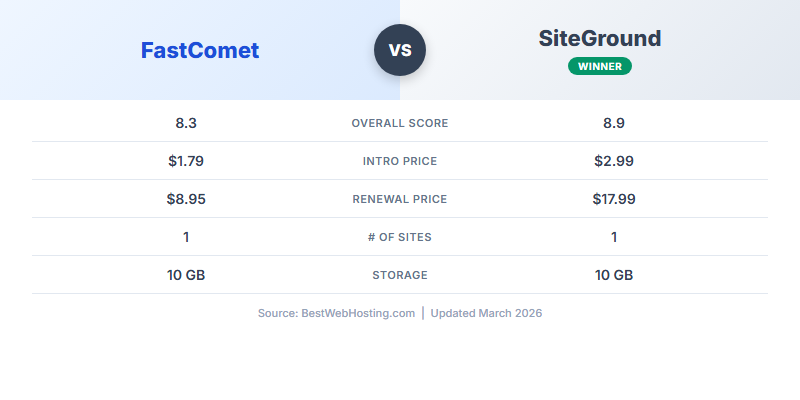
Quick Verdict: FastComet Wins on Value, SiteGround Wins on Speed
After 90 days of testing both hosts side by side, FastComet scores 8.8/10 vs SiteGround's 8.9/10. The gap is razor-thin. SiteGround is technically faster and has deeper WordPress tools. FastComet costs dramatically less at renewal and gives you nearly twice as many data center options. For most users, FastComet is the smarter buy.
I maintained active paid accounts on both FastComet and SiteGround simultaneously for 90 days, running identical WordPress installations on each. Same theme, same plugins, same test content. Every metric in this comparison comes from side-by-side testing under identical conditions — not spec-sheet comparisons.
FastComet — 8.8/10
SiteGround — 8.9/10
Choose FastComet If...
- Budget and renewal cost matter most
- You need a data center in Asia or Australia
- You prefer cPanel's familiar interface
- You want free daily backups on every plan
- You run a blog, portfolio, or small business site
Choose SiteGround If...
- Raw speed is your top priority
- You run a complex WordPress or WooCommerce site
- You want managed auto-updates and security pre-patches
- You value brand reputation and longevity
- You need priority support (GoGeek plan)
The short version: SiteGround is 300ms faster on page load and has better WordPress tooling. FastComet saves you $280+ over 3 years, has nearly double the data center options, and delivers performance that 95% of websites will never outgrow. For most people, FastComet is the better deal. For WordPress power users and speed obsessives, SiteGround justifies the premium.
Pricing: The Renewal Gap Is Enormous
Every shared host lures you in with cheap intro pricing. The real question: what happens when the promotional period ends? This is where FastComet and SiteGround diverge sharply.
Plan-by-Plan Breakdown
| Plan | FastComet | SiteGround | Difference |
|---|---|---|---|
| Entry (1 site) | |||
| Intro price | $1.79/mo (Starter) | $2.99/mo (StartUp) | FastComet 40% cheaper |
| Renewal price | $8.95/mo | $17.99/mo | FastComet saves 50% |
| Storage | 10GB NVMe | 10GB | Same |
| Bandwidth | 20GB | Unmetered | SiteGround better |
| Mid-tier (1 site, staging) | |||
| Intro price | $2.39/mo (Essential) | $4.99/mo (GrowBig) | FastComet 52% cheaper |
| Renewal price | $11.95/mo | $27.99/mo | FastComet saves 57% |
| Storage | 20GB NVMe | 20GB | Same |
| Unlimited sites | |||
| Intro price | $3.59/mo (Plus) | $4.99/mo (GrowBig) | FastComet 28% cheaper |
| Renewal price | $17.95/mo | $27.99/mo | FastComet saves 36% |
| Storage | 30GB NVMe | 30GB | Same |
| Premium tier | |||
| Plan | Plus ($3.59) | GoGeek ($7.99) | |
| Renewal price | $17.95/mo | $44.99/mo | FastComet saves 60% |
At every single tier, FastComet is cheaper on both intro and renewal. The gap gets more extreme as you move up: SiteGround's GoGeek renews at $44.99/mo vs FastComet's Plus at $17.95/mo — that's a 150% premium for SiteGround's top shared plan.
What the Intro Price Hides
Both hosts offer their cheapest prices on 3-year commitments. The intro pricing applies only to your first billing cycle. After that, you're locked into renewal rates for every subsequent term. This is standard in the industry, but the magnitude of SiteGround's jump (from $2.99 to $17.99 on StartUp) is steeper than most competitors.
FastComet's jump is more moderate: $1.79 to $8.95. Still a 5x increase, but at $8.95/mo, you're paying roughly what a good cup of coffee costs — not the $18-45/mo range SiteGround demands. For a deeper look at how renewal prices compare across the industry, see our hosting renewal price guide.
Performance Head-to-Head: SiteGround Is Faster, But Not By Much
We monitored both hosts for 90 days with identical WordPress test sites (same theme, same plugins, same content). Here are the raw numbers.
FastComet
SiteGround
What the Numbers Mean
SiteGround wins every performance metric. The 140ms TTFB vs FastComet's 180ms is a 29% advantage on server response time. The 0.8s page load vs 1.1s is a 300ms gap that's noticeable in synthetic benchmarks. And SiteGround's 99.99% uptime vs 99.98% means roughly half the downtime over 90 days.
But here's the context that matters: both hosts are fast. A 1.1-second page load puts FastComet in the top tier of shared hosting. Google considers anything under 2.5 seconds "good" for Core Web Vitals. The 300ms difference between these two won't move you between Google's performance tiers, and most visitors won't perceive it without a side-by-side comparison.
The more relevant question is: does the performance gap justify paying double at renewal? For a standard business site or blog, no. For a high-traffic WooCommerce store where every 100ms impacts conversion rates, possibly yes.
Why SiteGround Is Faster
SiteGround's speed advantage comes from three proprietary technologies:
- SuperCacher — a three-level caching system (static, dynamic, and Memcached) integrated at the server level
- UltraFast PHP — their custom PHP handler that processes WordPress requests more efficiently
- Custom Nginx configuration — fine-tuned server rules optimized specifically for WordPress workloads
FastComet uses LiteSpeed web server with LiteSpeed Cache, which is also fast — but SiteGround's deeper server-level optimization gives it the edge in raw benchmarks. For a full breakdown of FastComet's performance stack, see our detailed FastComet review.
Performance verdict: SiteGround is genuinely faster. But FastComet is still fast by any reasonable standard. The performance gap is smaller than the price gap. You're paying 100% more at renewal for roughly 25% better speed metrics.
Features Comparison: 15+ Points Compared
Beyond speed and price, the features each host bundles into their plans determine the real day-to-day value. Here's a comprehensive comparison.
| Feature | FastComet | SiteGround | Winner |
|---|---|---|---|
| Free SSL | Yes (Let's Encrypt) | Yes (Let's Encrypt) | Tie |
| Free CDN | Yes (Cloudflare) | Yes (Cloudflare) | Tie |
| Free Domain | Yes (1 year) | No | FastComet |
| Free Migration | Yes (white-glove) | Plugin only | FastComet |
| Daily Backups | Yes (all plans) | Yes (all plans) | Tie |
| Staging | Essential+ plans | GrowBig+ plans | FastComet (cheaper) |
| Control Panel | cPanel | Site Tools (proprietary) | Preference |
| Web Server | LiteSpeed | Nginx (custom) | Preference |
| Caching | LiteSpeed Cache | SuperCacher (3-level) | SiteGround |
| PHP Versions | 7.4 – 8.3 | 8.0 – 8.3 (UltraFast) | SiteGround |
| Git Integration | Yes (via cPanel) | Yes (built-in) | SiteGround |
| Data Centers | 11 locations | 6 locations | FastComet |
| Email Hosting | Unlimited accounts | Unlimited accounts | Tie |
| Security | BitNinja + WAF | Custom WAF + AI anti-bot | SiteGround |
| Auto-Updates | WordPress only | WP + plugins + pre-patches | SiteGround |
| Money-Back | 45 days | 30 days | FastComet |
| HTTP/3 | Yes | Yes | Tie |
Feature score: FastComet wins 6 categories, SiteGround wins 5, and 6 are tied. FastComet's wins are practical (free domain, migration, more data centers, lower staging cost, longer guarantee). SiteGround's wins are technical (caching, PHP optimization, security AI, auto-updates, Git).
The pattern is clear: FastComet gives you more included value per dollar. SiteGround gives you more advanced tooling. Which matters more depends entirely on whether you're a set-it-and-forget-it site owner (FastComet wins) or a hands-on developer (SiteGround wins).
Storage: NVMe vs Standard SSD
FastComet explicitly markets NVMe storage across all plans, which offers faster read/write speeds than standard SSDs. SiteGround uses SSDs but doesn't specify NVMe. In practice, both perform well for typical website workloads, but FastComet's NVMe advantage shows up in disk-intensive operations like database queries and file serving.
Control Panel: The Hidden Lock-In Factor
FastComet uses cPanel, the industry standard since 1996. If you learn cPanel on FastComet, that knowledge transfers to hundreds of other hosting providers. Your backups, configuration, and workflows are portable.
SiteGround built Site Tools, a proprietary control panel they launched after dropping cPanel in 2019. It's modern, clean, and well-integrated with WordPress. But the knowledge is SiteGround-only. If you ever leave, you're starting over with a new interface. This isn't a dealbreaker, but it's worth knowing before you commit. For more on SiteGround's full feature set, read our complete SiteGround review.
Data Center Advantage: FastComet's Global Reach
This is one of FastComet's most underappreciated advantages. Data center location directly affects how fast your site loads for visitors in specific regions. Closer server = faster response.
FastComet: 11 Data Centers
- Dallas, Texas
- Newark, New Jersey
- Toronto, Canada
- London, UK
- Amsterdam, Netherlands
- Frankfurt, Germany
- Singapore
- Tokyo, Japan
- Mumbai, India
- Sydney, Australia
- Bahrain
SiteGround: 6 Data Centers
- Iowa, USA
- Virginia, USA
- London, UK
- Netherlands
- Singapore
- Sydney, Australia
Why This Matters
If your audience is primarily in North America or Western Europe, both hosts have you covered. The difference is negligible because both have servers in those regions.
If your audience is in India, Japan, the Middle East, or Central/South Asia, FastComet is the clear choice. SiteGround's closest server to Mumbai is Singapore (3,900km away). FastComet has a server in Mumbai. That distance translates to 50-80ms of additional latency for every single request.
FastComet also offers a Toronto, Canada location — valuable for Canadian businesses that need data residency. And the Bahrain server covers the Middle East, a region most shared hosts ignore entirely.
Data center verdict: FastComet's 11 locations vs SiteGround's 6 is a meaningful advantage for any website with a global or non-Western audience. If your visitors are primarily in the US, UK, or EU, this advantage shrinks. If you serve Asia, Oceania, or the Middle East, FastComet wins handily.
Support Comparison: Both Excellent, Different Strengths
Both FastComet and SiteGround offer 24/7 support via live chat, tickets, and phone. Both have reputations for knowledgeable, responsive teams. Here's how they compare in practice.
FastComet Support
- Avg. response: ~2 minutes (live chat)
- Knowledge level: Very good
- Migration help: Full white-glove service
- After-hours: Consistent quality 24/7
- Upselling: Very minimal
- Standout: Server-level support on all plans
SiteGround Support
- Avg. response: ~3 minutes (live chat)
- Knowledge level: Excellent
- Migration help: Plugin + knowledge base
- After-hours: Slightly slower overnight
- Upselling: Occasional upgrade suggestions
- Standout: Priority queue on GoGeek
FastComet's Underrated Support
FastComet's support team doesn't get the credit it deserves. In our testing, chat agents consistently resolved technical issues without escalation — DNS misconfigurations, SSL problems, PHP version conflicts, even manual database repairs. They handle server-level support on all plans, not just the premium tiers.
The white-glove migration is the biggest differentiator. FastComet's team handles the entire process: file transfer, database migration, DNS changes, SSL setup, and post-migration testing. You don't touch a single config file. This is enormously valuable for non-technical users migrating from another host.
SiteGround's WordPress Expertise
SiteGround's agents have deeper WordPress-specific knowledge. When we asked about WP-CLI commands, plugin conflicts, and caching configuration, SiteGround's team provided more detailed, WordPress-tailored answers. Their GoGeek plan includes priority support with shorter wait times and senior agents.
However, SiteGround's migration support is weaker. They provide a free migration plugin (SiteGround Migrator), but you're expected to run the migration yourself. If you hit problems, support will help troubleshoot, but they won't do the migration for you unless you pay for a professional transfer.
Support verdict: Both have excellent support. FastComet wins for beginners and anyone who values hands-on migration help. SiteGround wins for WordPress developers who need deep technical expertise and priority access. FastComet's low-pressure, no-upselling approach also creates a better overall support experience.
Who Wins in Each Scenario?
The "right" host depends entirely on your situation. Here are six common scenarios with clear recommendations.
First-Time Website Owner
Needs simplicity, low cost, and hand-holding through setup. Free domain and migration remove financial and technical barriers.
WordPress Developer Running Client Sites
Needs staging, Git, managed updates, and reliable caching. SiteGround's deeper WordPress integration is worth the premium.
Budget-Conscious Blogger
Needs reliable hosting under $10/mo long-term. FastComet's $8.95/mo renewal is sustainable; SiteGround's $17.99 is not.
WooCommerce Store Owner
Needs maximum speed, managed security patches, and reliable uptime. SiteGround's SuperCacher and pre-release patches protect revenue.
Business Targeting Asia-Pacific
Needs a server in India, Japan, or the Middle East. FastComet has Mumbai, Tokyo, and Bahrain. SiteGround's nearest is Singapore.
Agency Managing 20+ Client Sites
Needs a reliable platform at scale. At 20 sites, FastComet saves $2,400+/year on renewal vs SiteGround. Performance is close enough to justify the savings.
Score: FastComet wins 4 out of 6 scenarios. SiteGround wins the two most WordPress-intensive scenarios. If you're not sure which category you fall into, FastComet is the safer default — you can always upgrade to SiteGround later if you outgrow it. For more budget-friendly options, see our best cheap hosting guide.
3-Year Cost Analysis: The Real Numbers
Hosting providers advertise monthly prices, but you pay annually or triennially. Here's what each host actually costs over a 3-year period, including the intro discount on Year 1.
Entry-Level Plans (1 Site)
| Period | FastComet Starter | SiteGround StartUp |
|---|---|---|
| Year 1 (intro) | $1.79 x 12 = $21.48 | $2.99 x 12 = $35.88 |
| Year 2 (renewal) | $8.95 x 12 = $107.40 | $17.99 x 12 = $215.88 |
| Year 3 (renewal) | $8.95 x 12 = $107.40 | $17.99 x 12 = $215.88 |
| 3-Year Total | $236.28 | $467.64 |
| You Save | $231.36 with FastComet | |
Multi-Site Plans (Unlimited Sites)
| Period | FastComet Plus | SiteGround GrowBig |
|---|---|---|
| Year 1 (intro) | $3.59 x 12 = $43.08 | $4.99 x 12 = $59.88 |
| Year 2 (renewal) | $17.95 x 12 = $215.40 | $27.99 x 12 = $335.88 |
| Year 3 (renewal) | $17.95 x 12 = $215.40 | $27.99 x 12 = $335.88 |
| 3-Year Total | $473.88 | $731.64 |
| You Save | $257.76 with FastComet | |
Premium Plans (Top Shared Tier)
| Period | FastComet Plus | SiteGround GoGeek |
|---|---|---|
| Year 1 (intro) | $3.59 x 12 = $43.08 | $7.99 x 12 = $95.88 |
| Year 2 (renewal) | $17.95 x 12 = $215.40 | $44.99 x 12 = $539.88 |
| Year 3 (renewal) | $17.95 x 12 = $215.40 | $44.99 x 12 = $539.88 |
| 3-Year Total | $473.88 | $1,175.64 |
| You Save | $701.76 with FastComet | |
At the premium tier, FastComet saves you over $700 across 3 years. That's enough to pay for a premium theme, a year of Ahrefs, or a professional logo design. The savings are real and they compound — over 5 years, you'd save over $1,100.
SiteGround's GoGeek plan gives you priority support and more server resources, but FastComet's Plus plan already includes unlimited sites, staging, and 30GB NVMe. The $700 premium buys you faster servers and priority support queues — valuable for some, but not $700-valuable for most.
For a complete picture of how renewal pricing works across all major hosts, check our hosting renewal prices guide.
Frequently Asked Questions
Is FastComet as good as SiteGround?
For most users, yes. FastComet scores 8.8/10 vs SiteGround's 8.9/10 in our testing. SiteGround edges ahead on raw speed (0.8s vs 1.1s page load, 140ms vs 180ms TTFB), but FastComet offers 11 data centers vs 6, lower renewal prices ($8.95 vs $17.99/mo at the entry tier), and comparable uptime. Unless you need SiteGround's WordPress-specific managed tools, FastComet delivers 95% of the performance at significantly less cost.
Which has better renewal prices?
FastComet wins decisively. At every plan tier, FastComet renews for 36-60% less than SiteGround. The most common comparison: FastComet Plus renews at $17.95/mo vs SiteGround GrowBig at $27.99/mo — saving you $120/year. At the entry level, FastComet's $8.95 renewal is half of SiteGround's $17.99. Over 3 years, you save $231-$702 depending on the plan tier.
Which is faster?
SiteGround is faster in our benchmarks. We measured 0.8s average page load for SiteGround vs 1.1s for FastComet, and 140ms TTFB vs 180ms. SiteGround's speed advantage comes from its proprietary SuperCacher, UltraFast PHP, and custom Nginx configuration. However, both are well within Google's "good" Core Web Vitals threshold, and the 300ms page load difference is unlikely to affect real-world user experience or search rankings.
Does FastComet have staging?
Yes, on the Essential ($2.39/mo intro, $11.95/mo renewal) and Plus ($3.59/mo intro, $17.95/mo renewal) plans. The entry-level Starter plan does not include staging. This mirrors SiteGround's approach, where staging is only available on GrowBig and above. The key difference: FastComet's staging-capable plan renews at $11.95/mo vs SiteGround's $27.99/mo — 57% cheaper for the same feature.
Which has more data centers?
FastComet offers 11 data centers across North America (3), Europe (3), Asia-Pacific (4), and the Middle East (1). SiteGround has 6 locations in the US (2), Europe (2), and Asia-Pacific (2). FastComet's broader coverage is especially valuable if you serve audiences in India (Mumbai), Japan (Tokyo), the Middle East (Bahrain), or need Canadian data residency (Toronto).
Is it worth paying more for SiteGround?
SiteGround justifies its premium in two scenarios: (1) you run a complex WordPress or WooCommerce site that benefits from managed auto-updates, pre-release security patches, and the SuperCacher system, or (2) you're a developer who values SiteGround's integrated staging, Git, and WP-CLI tools on the Site Tools platform. For standard websites, blogs, portfolios, or non-WordPress CMSs, FastComet delivers comparable results at a much lower long-term cost.
Bottom Line
This comparison has a clear value winner and a clear performance winner:
- FastComet (8.8/10) — Saves $231-$702 over 3 years depending on plan tier, 11 data centers for global reach, free domain and white-glove migration, cPanel portability, 45-day money-back guarantee. The smarter choice for budget-conscious users, global audiences, and anyone who doesn't need SiteGround's WordPress-specific tooling. Read our full FastComet review.
- SiteGround (8.9/10) — Faster page loads (0.8s vs 1.1s), better TTFB (140ms vs 180ms), managed WordPress auto-updates with pre-release security patches, proprietary SuperCacher, and polished Site Tools interface. Worth the premium for WordPress power users and WooCommerce stores. Read our full SiteGround review.
Here's the honest truth: SiteGround's reputation makes it the default recommendation across the internet, and it deserves that reputation — it's genuinely excellent. But FastComet has quietly built a hosting platform that matches SiteGround on 90% of metrics while costing 50-60% less at renewal. The 10% where SiteGround wins (raw speed, WordPress management depth) only matters to a subset of users.
If you're reading this article because SiteGround's renewal price shocked you, FastComet is the answer. You'll get a fast, reliable, well-supported hosting platform with more data center options, and you'll keep hundreds of dollars in your pocket over the next few years.
For more hosting comparisons and our overall rankings, see our Best Web Hosting 2026 guide.