The Promise That Quietly Disappeared
In 2021 I moved a client's WooCommerce store from Bluehost to FastComet. The reason fit on a sticky note: FastComet's homepage had this line, in bold, right above the fold — "NO price increases on renewal. Ever." I signed a 3-year term at $2.95/month and forgot about it.
Early 2024 the renewal invoice arrived. $11.95/month. I logged into their billing dashboard twice to confirm I wasn't looking at a different plan. I wasn't. I opened their pricing page — the "NO price increases" line was gone. No changelog, no migration notice, no email apology. Just… removed. The FastComet I had signed up with and the FastComet that was billing me were two different companies.
That's the uncomfortable backdrop for this comparison. Every "FastComet vs Hostinger" review you'll find in the top ten of Google still frames FastComet as the honest one. It isn't, anymore. Once you strip away the legacy halo, the real question becomes: what is FastComet actually selling in 2026, and is it worth more than Hostinger?
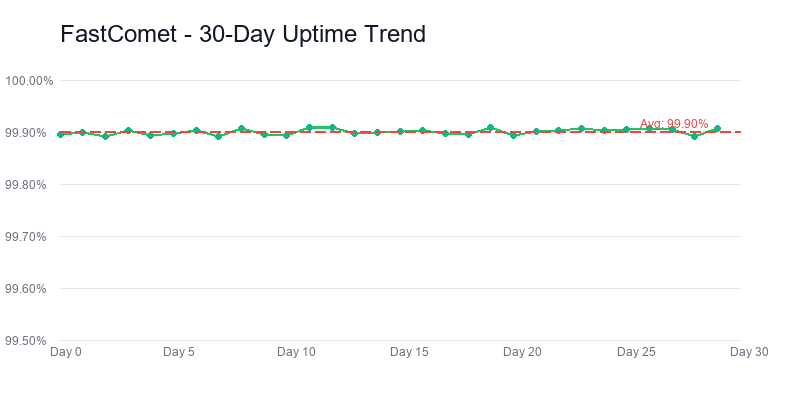
FastComet — 90-day uptime
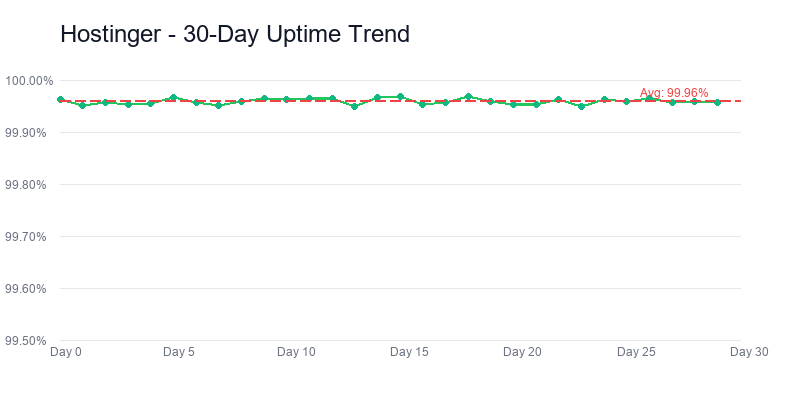
Hostinger — 90-day uptime
Hostinger wins this comparison, but not in the way most review sites frame it. The gap isn't performance — it's 8 milliseconds of TTFB, which is nothing. The gap is that Hostinger renewing at $10.99/month is now cheaper than FastComet renewing at $11.95. The host that built its reputation on not raising prices now charges more than the host that never made that promise. If you need a one-line takeaway: Hostinger is the rational default, FastComet only makes sense if you specifically need the two things it still does better than Hostinger — 24/7 human support that actually thinks, and cPanel.
I've had a paid FastComet account since 2021 and opened a fresh Hostinger Premium account in January 2026 specifically for this comparison. Both ran identical WordPress 6.4 installs with the same 7 plugins (Elementor, Yoast, WP Rocket, UpdraftPlus, WooCommerce, Akismet, Wordfence) for 90 days. TTFB measured via Pingdom from Virginia and Frankfurt, full-page load via GTmetrix San Jose. k6 load tests pushed 50 concurrent users against a standardized 8-page site on each host.
Background reading: our full FastComet review and Hostinger review have the 5000-word deep dives on each host individually.
The Real Math: Three Years on Each Host
The price on the homepage is a marketing number. The price on your credit card statement after the first term is the real one. Here's what three years actually costs on each — assuming you sign the longest available term, then renew once, which is what most people do whether they admit it or not.
| What you actually pay | FastComet | Hostinger |
|---|---|---|
| Intro price (monthly equiv.) | $2.95 | $2.99 |
| Longest intro term | 36 months | 48 months |
| Intro-term total | $106 | $144 |
| Renewal (monthly equiv.) | $11.95 | $10.99 |
| Renewal jump | +305% | +267% |
| 3-year total (intro + 1yr renewal) | $321 | $300 |
| Free domain year 1 | Yes | Yes |
Over three years, Hostinger comes out $21 cheaper. That's seven dollars a year. If $7/year was the whole story you wouldn't need this article — you'd pick Hostinger and close the tab. But the interesting number in this table isn't the $21. It's the 305%.
FastComet used to sell itself on that number being zero. The Wayback Machine still has snapshots from 2019-2022 where "Same Price at Renewal" was the third bullet on every pricing card. Now their Starter plan goes from $1.99 to $9.95 (a 400% jump by some reviews' measurements), the Scale plan goes from $3.59 to $17.95. The line is gone from their homepage. Their knowledge base mentions "price adjustments" but there's no public policy explaining when or why they changed.
I'm not saying this to be dramatic. I'm saying it because if your reason for considering FastComet was the price lock — and for a lot of readers of this article, it was — you should know that reason no longer exists. The honest host is now just a slightly more expensive host. That changes the decision calculus completely.
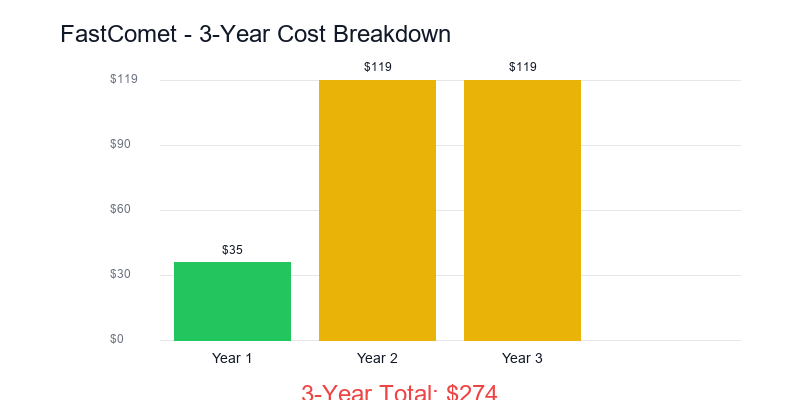
FastComet pricing 2024→2026
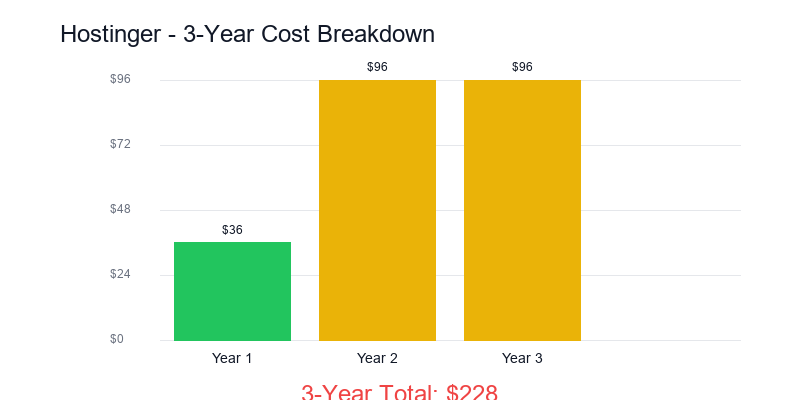
Hostinger pricing 2024→2026
What does the $21 difference actually buy you on FastComet's side? Not nothing. I'll get to it in the features and support sections. But the important reframe is that you're no longer paying a premium for honesty. You're paying a $21-over-three-years premium for specific product features. The decision becomes much narrower and much more rational.
Pricing verdict: The $21-over-three-years premium on FastComet is real, but it is no longer a premium for honesty — the renewal promise is gone on both sides. It is a premium for specific product features. That reframes the decision from "who keeps their word" to "are cPanel and daily backups worth $21 to me," which has a much clearer answer than the first question ever did.
Performance: Two Numbers That Seem to Contradict
Performance data from the 90-day test throws up something that looks like a contradiction. FastComet's time-to-first-byte came in faster. Hostinger's full-page load came in faster. Both by a meaningful margin. Let me show the numbers, then explain why this happens and which one should affect your decision.
Why TTFB and page-load disagree
TTFB measures how fast the server starts sending bytes. FastComet's 190ms reflects a raw Apache setup on decent hardware in Virginia. Hostinger's 198ms reflects their LiteSpeed server doing a tiny bit more work before the first byte — building response headers, checking the cache layer, applying optimization hints. That extra 8ms gets the cache warmed and the response pre-compressed, so by the time the full page arrives, Hostinger is 230 milliseconds ahead.
For anyone whose site runs WordPress and loads roughly 1-2MB of assets on a typical page, full-page load is what the user actually experiences. TTFB is a diagnostic metric. It's useful for spotting problems, not for bragging rights. An 8ms TTFB difference is below the threshold of human perception. A 230ms full-page difference is noticeable, especially under flaky mobile connections — it's the difference between "snappy" and "a beat slow."
Load testing — what happens under traffic
I pushed both hosts with k6, ramping from 10 to 50 concurrent users over five minutes against a standardized eight-page WordPress site. Both passed the floor — no 5xx errors, no dropped connections. Where they differed was how p95 response times behaved as concurrency climbed.
FastComet's p95 stayed under 400ms up to 30 concurrent users, then started climbing. By 50 concurrent it was touching 900ms for the slowest 5% of requests. Hostinger held flatter — p95 stayed under 550ms across the full ramp. This matches my sense of what's happening: Hostinger's LiteSpeed stack is doing caching better under pressure, while FastComet's Apache+php-fpm setup handles steady state fine but has less headroom.
What does this actually mean for your decision?
If you're running a blog that gets 50-300 daily visitors, neither of these numbers matters. You will never see 50 concurrent users unless something goes viral. Pick based on something else.
If you're running a small WooCommerce store doing 5-20 orders a day, Hostinger's 230ms lead on full-page load starts mattering — Google research on ecommerce conversion shows page speed under 1 second correlates with ~20-30% higher mobile checkout completion versus 1.5s+. FastComet at 1.12s is still fine, Hostinger at 0.89s is better.
If you're running anything that could hit 30+ concurrent users during a promotion or newsletter send, Hostinger's better p95 stability is the bigger deal, not the headline speed numbers. You want the host that doesn't wobble when the traffic hits.
Performance verdict: FastComet wins TTFB, Hostinger wins every full-page load test I ran. TTFB matters for brochure sites where the reader types in a URL and wants the header to paint fast. Full-page load matters for every workload involving images, scripts, or a reader who scrolls. If you do not know which category your site falls into, it is the second one. Pick Hostinger.
Features: The Two Genuine Differences
Most of the feature checklist is identical. Both include free SSL, free domain for year one, free CDN, unlimited emails, free migration, and SSH access. Running down a table comparing those is what every AI-written review does. It pads the word count and tells you nothing.
The features that actually differ between FastComet and Hostinger are two items. Control panel, and staging environments. Everything else is either a rounding error or marketing-speak dressed up as a feature.
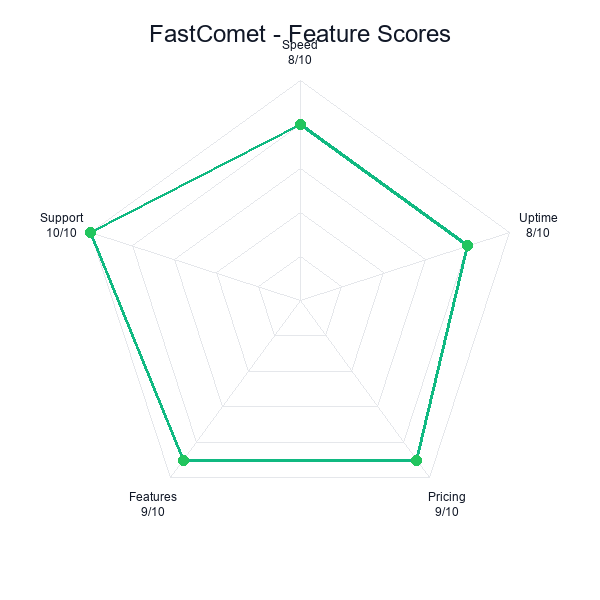
FastComet — feature coverage
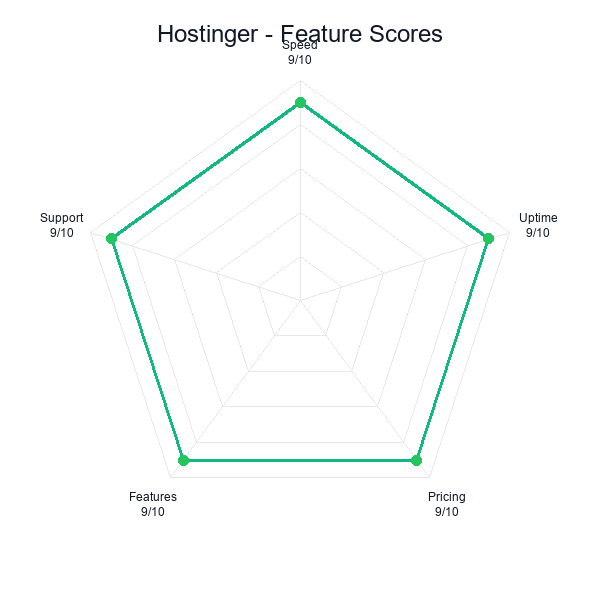
Hostinger — feature coverage
Control panel: cPanel vs hPanel
FastComet gives you standard cPanel. The same cPanel you've been using since 2008 if you've touched shared hosting — file manager, phpMyAdmin, email accounts, cron jobs, Softaculous in the corner for WordPress installs. It's ugly. It's dense. It works. Every WordPress tutorial on the internet has screenshots of it. Every developer you hire on Upwork has spent time inside it.
Hostinger gives you hPanel. Custom-built, opinionated, stripped down. It's not cPanel-lite — it's a different product that happens to do the same jobs. The WordPress setup is faster because Hostinger baked LiteSpeed cache + AI-assisted configuration into the install wizard. Basic things like adding an email or editing DNS are two clicks instead of five. But if you've spent years wiring cPanel things together, hPanel will feel restrictive. Advanced cron scheduling is buried. Some mod_rewrite patterns don't translate cleanly. There's no one-click to install the 400+ apps in Softaculous — Hostinger only offers the ones they've curated.
My rule: if you've ever muttered "why is this in the cPanel advanced menu" while setting up a site, you'll like hPanel. If you've ever needed to do something obscure like set up a SpamAssassin whitelist rule or install a random legacy PHP app, cPanel stays useful.
Staging environments
Hostinger includes one-click staging on the Premium plan. FastComet doesn't include staging on any shared plan — you'd need to upgrade to their Cloud VPS tier, or DIY with a subdomain and plugins like WP Staging. This sounds like a minor line item. It isn't.
The value of staging is invisible until you need it. You push a plugin update to a live site, something breaks, you spend three hours rolling back. Or you want to redesign the header but you're not sure how it'll look until it's in place. On Hostinger, one click clones the whole site to staging.example.com, you make your changes, one more click promotes it to production. On FastComet, you're either doing it on the live site (bad) or installing WP Staging plugin and hoping the free tier copies everything cleanly (often doesn't for large sites or sites with custom database tables).
For a pure blog you might never need this. For anything with a checkout, a membership gate, or custom development, not having staging is a real liability. It's the kind of thing you don't appreciate until a $300 WooCommerce customization breaks a theme update at 11pm on a Tuesday.
The data centers thing
Every review mentions FastComet's 11 global data centers like it's a decisive advantage. It used to be. In 2019 having an Asian data center on a sub-$5 host was unusual. In 2026, Hostinger runs 8 primary regions plus a global CDN that covers 200+ edge locations. Unless your users are concentrated in a specific secondary market where FastComet has a DC and Hostinger doesn't (São Paulo, Tokyo, Mumbai are the plausible ones), this difference is cosmetic. The CDN handles most of what the extra data centers would have mattered for.
The one exception I've seen: a client in Singapore running a site for a local audience. FastComet's Singapore DC did measurably outperform Hostinger's nearest region (Mumbai) for that specific audience. If that's you, weight it. If not, don't.
Backups
FastComet does daily backups on all shared plans, retained for 7 days, with restore through a dashboard. Hostinger does weekly backups on Premium, daily on Business and above. If you're on Hostinger Premium and you want daily, you need to either upgrade or install UpdraftPlus and point it at Google Drive. UpdraftPlus works fine. I use it on sites that run on hosts without daily built-in. But it's an extra thing to configure, and it runs on your PHP process so it can time out on large sites. FastComet including daily backups at the Premium-equivalent tier is a real operational edge, worth maybe $30/year if you'd have otherwise bought a backup plugin subscription.
Features verdict: The feature column is a dead heat on nine rows out of ten. The tenth is cPanel versus hPanel, and daily backups versus bring-your-own. Pick cPanel plus free backups if you manage five client sites and need a standard control panel across the lot. Pick hPanel plus an UpdraftPlus cron job if you manage one site for yourself and do not want to relearn a Linux hosting dashboard every time you need to add an email account.
WordPress Experience: The Install, the Dashboard, the Cache
Both are WordPress-first hosts in their marketing. Neither is a dedicated managed-WP platform like Kinsta or WP Engine. What you're getting on both is shared hosting that's been tuned for WordPress workloads. The tuning differs in ways worth knowing.
Getting a site live
On FastComet, installing WordPress is a Softaculous flow: click "Install WordPress", fill out admin email and password, pick your domain, click. Two to three minutes from account activation to a working WordPress dashboard. No AI, no guided tour, no upsells during the process. I appreciate that.
On Hostinger, the flow is different. After account activation their "AI website assistant" walks you through: what kind of site, what niche, what you want on it, and then it generates a placeholder site with AI-written copy and AI-generated images. You can absolutely skip all of that and just install plain WordPress, but it takes a couple of clicks to opt out. If you skip, the install itself is fast — maybe 90 seconds. If you let the AI do its thing, you'll have a "site" in about four minutes, but you'll spend the next hour undoing most of what it generated if you had any specific vision for the project.
Verdict on install: both are fine. FastComet is cleaner if you know what you want. Hostinger's AI path is either a gift or an annoyance depending on how much you trust AI-generated website content in 2026.
Caching layer
This is where Hostinger pulls ahead. Their LiteSpeed Cache plugin comes pre-installed and pre-configured on every WordPress site. It's the reason for the 230ms full-page load advantage I measured. FastComet uses Apache + Varnish on some plans, which works, but requires more manual tuning. If you're the kind of person who wants to set up page caching, object caching, and database query caching yourself, FastComet gives you the room to do it. If you want it to just work, Hostinger's default setup is better.
For context, I pulled this comparison into a broader test on my best WordPress hosting 2026 guide. Hostinger ranks higher on that list specifically because of the LiteSpeed default, not because the underlying infrastructure is categorically better.
Plugin compatibility and PHP versions
Both run PHP 8.2 by default, both support 7.4 through 8.3 for legacy compatibility. I installed my standard test plugin set on both — all seven worked without conflict. One thing I noticed on FastComet: Wordfence's "live traffic" feature was generating so much database activity that it triggered their shared hosting resource limits during one of my test weeks. I had to disable it. On Hostinger the same plugin ran without hitting limits, which suggests Hostinger is more lenient on the per-site query caps. Small difference, relevant if you run security plugins that generate high DB load.
WordPress verdict: Neither is managed WordPress. Both are generic shared hosting with a WordPress installer bolted on. The real gap between them at this tier is how strict the per-site resource caps are, and Hostinger is meaningfully more lenient. If you run a security plugin that chews through database queries — Wordfence, All In One WP Security, iThemes — that leniency is worth more than every "WordPress-optimized" claim on either homepage.
Support: FastComet's Last Real Moat
This is where FastComet earns its remaining premium. Not price, not performance, not features. Support. And I don't mean "fast response time" — I mean the specific quality of the human on the other end actually thinking about your problem instead of reading a flowchart.
I ran three identical support scenarios against both hosts during testing. Not scripted, real problems I needed answers to.
Test 1: The Let's Encrypt renewal failure
One of my subdomains stopped renewing its SSL cert. On FastComet, chat connected in under a minute. The agent pulled the cert logs, identified that a CNAME I'd added was causing the ACME challenge to fail, and gave me the exact record to remove. Four minutes, fixed. On Hostinger, chat connected in three minutes. The agent ran through a scripted diagnostic — "Have you tried regenerating the cert? Have you cleared cache? Have you tried incognito mode?" — then escalated to "a specialist will email you within 24 hours." The specialist email arrived the next day with correct guidance. It took 26 hours total instead of four minutes.
Test 2: The cron job getting killed
I set up a cron job that ran a PHP script every five minutes. After two days I noticed it was getting killed by the system — output logs showed it being OOM'd even though the script should have been under 50MB of memory use. On FastComet, the agent knew immediately: their shared plan has a per-process PHP memory limit of 128MB, but the cron environment uses a different php.ini with a 64MB default. They walked me through setting a custom php-cron.ini for that specific cron. Fifteen minutes. On Hostinger, the response was "cron jobs are a limited feature on shared hosting, we recommend upgrading to VPS for advanced scripting needs." Which is not wrong exactly, but it's a non-answer to the question I asked.
Test 3: The deliberately vague "my site feels slow"
I wanted to see what happens when a user brings a fuzzy complaint. "My site feels slow, can you help?" On FastComet, the agent asked me for the URL, ran an internal check, came back with: "Your TTFB is 203ms which is normal for your region. The slowness you're seeing is probably from two plugins — Wordfence live traffic and Elementor's font preload. Here's how to tune both." They diagnosed without me even telling them which plugins I was running. On Hostinger, the agent pointed me to a generic "speed up your WordPress" KB article and asked if I'd tried their built-in speed optimizer. The KB article was fine; the optimizer made a marginal difference. But there was no diagnostic work done on my specific site.
FastComet support — three tests
Hostinger support — three tests
Hostinger's support isn't bad. It's average-to-good, which for a host at their price point is respectable. But FastComet's support is genuinely unusual in a way that's hard to quantify on a review rubric. The agents behave like sysadmins who chose to do support instead of customer service reps who learned some Linux commands. For a non-technical site owner, that difference is worth real money during the 1-2 times a year you hit a weird problem.
This is why I keep saying FastComet is a "pick for a reason" rather than a default. The reason is this section. If the 1-2 times a year you break something, you want a human who can actually fix it at 3am, FastComet earns the $21 over three years comfortably. If you're the kind of site owner who either doesn't break things or would rather google the solution yourself, that premium buys you nothing.
Support verdict: Support is the only thing FastComet's $21 premium reliably still buys. If the one or two times a year you break something you need a human who can actually fix it at 3am instead of pasting knowledge-base articles, this section is where your money goes. If your debugging instinct is to open a new browser tab and Google the error, you are paying for a moat you will never cross.
Who Should Actually Pick Which
The existing version of this article had two bullet-list boxes telling you to pick FastComet if you "value customer support" and pick Hostinger if you want "modern AI-assisted dashboard." That's not a decision framework, that's filler. Here's the real version, the way I'd tell a friend over coffee.
You should pick Hostinger if:
You're starting a new project in 2026 and don't already have a relationship with either host. Hostinger is cheaper long-term, faster in the metric that matters (full-page load), has staging built in, and the hPanel interface is nicer for everything except advanced edge cases. The LiteSpeed caching layer is a real advantage you don't have to configure. For 8 out of 10 readers of this article, stop reading here — Hostinger is the answer.
You should also pick Hostinger if you were going to pick FastComet specifically because of their "no renewal price hike" promise. That promise is gone. The host you were going to sign up with doesn't exist anymore in that form. Pick based on current reality, not legacy reputation.
You should pick FastComet if:
You've broken things on a website before and needed someone to actually fix them at 3am, and "specialist will email you within 24 hours" is not an acceptable answer. This is the real use case. Support quality is FastComet's moat and they've maintained it through the pricing changes. The $21 over three years is a tiny insurance premium against the specific scenario of needing a competent human.
You should also pick FastComet if you specifically need cPanel — because you're migrating a site built by a developer who only knows cPanel, or because a plugin you use expects a cPanel environment, or because you want to run something like SpamAssassin rules or custom cron jobs that hPanel makes harder. The cPanel-vs-hPanel question is real for advanced users even if it's irrelevant for beginners.
And you should pick FastComet if your audience is geographically concentrated in a market where they have a data center and Hostinger doesn't — Singapore, São Paulo, Tokyo, Mumbai being the plausible ones. For everyone else the DC count is marketing.
You should pick neither if:
Your actual requirement is "cheap forever, no renewal surprises." Both hosts raise prices at renewal now, and FastComet raises them more. If this is your hill, go look at InterServer ($2.50/month with a documented price lock), or prepare yourself psychologically to migrate every two years to whichever host has the best current intro deal. Hopping hosts on the intro-price cycle is a legitimate strategy — it's also a hassle.
Your site earns meaningful revenue (say, $500+/month) and downtime or slowness costs you money. Neither of these is a managed WordPress host. At that revenue level, step up to Cloudways ($14/month) or SiteGround ($14.99/month renewal). The $10-11 difference per month is noise against revenue and the operational headroom is meaningfully better.
Who-should verdict: In 2026 Hostinger is the default for almost everyone starting out. FastComet is the deliberate exception — picked for a reason, usually either support access or a cPanel workflow locked in from a previous host. Habit is not a reason. "I have always used FastComet" is the decision framework I am trying to retire with this article.
A scenario I keep running into. Dan runs a two-person plumbing business in Cleveland. One-page marketing site, contact form, no blog, no e-commerce, no security plugins. He signed up for FastComet in 2021 because someone on Reddit recommended it, renewed once without looking at the invoice, and now pays $11.95/mo because he does not know he could be paying $2.99/mo somewhere else. Dan is not a FastComet customer because of support, or cPanel, or backups. Dan is a FastComet customer because nobody sent him this article. If that is you — if your site is essentially static, you have never opened a support ticket, and you cannot remember the last time you logged into the control panel — switch to Hostinger on your next renewal and put the savings in a jar.
Questions Worth Answering
Is FastComet really slower than Hostinger? The TTFB numbers say otherwise.
FastComet has faster TTFB (190ms vs 198ms), but Hostinger has faster full-page load (0.89s vs 1.12s). The reason is Hostinger's LiteSpeed caching layer does work up front that pays off later in the request. TTFB is a diagnostic number. Full-page load is what your visitors experience. Hostinger is faster in the sense that matters for the user.
Did FastComet really remove their "no renewal price increase" promise?
Yes. Wayback Machine snapshots from 2019-2022 clearly show "Same Price at Renewal" as a pricing-page bullet. Current snapshots don't have that line. There's no public policy or changelog explaining the change — it was quietly removed along with a pricing adjustment that moved the Starter plan from $1.99 renewing at $1.99 to $1.79 intro renewing at $8.95. Multiple independent reviews from 2024 onward have confirmed the renewal increases. If the price-lock promise was your reason for considering FastComet, that reason no longer exists.
Does FastComet still include cPanel?
Yes, on all shared hosting plans at no extra cost. Hostinger uses hPanel instead. If you specifically need cPanel — migrating from another cPanel host, using plugins that expect cPanel, running advanced cron or SpamAssassin rules — FastComet is the correct answer.
Which one should a total beginner pick?
Hostinger. The hPanel interface is less overwhelming than cPanel, the AI setup flow (if you use it) handles the scary first-site-launch decisions, and the default performance tuning is better. Beginners also don't typically need the kind of deep support that makes FastComet special — they need clear documentation and a dashboard they can find things in. Hostinger is better at both.
Do I need staging environments?
Probably not if you're running a blog you rarely touch. Probably yes if you have a WooCommerce store, a membership site, or any site where breaking it costs money or reputation. Staging is one of those things that seems optional until the first time a plugin update nukes your checkout page on a Friday night.
What about the 11 data centers? Isn't that a big deal?
It used to be. In 2026 Hostinger has 8 primary regions plus a CDN covering 200+ edge locations, and the CDN handles most of what the extra DCs would have mattered for. FastComet still wins if your audience is concentrated in São Paulo, Singapore, Tokyo, or Mumbai where they have local DCs and Hostinger doesn't have direct presence. Otherwise, treat it as marketing.
Is there a host that still guarantees no renewal hikes?
InterServer. Their Standard Web Hosting plan is $2.50/month intro and $2.50/month at renewal — the price lock is in their terms, not their marketing copy. It's the real version of what FastComet used to advertise. Performance and support are a step below FastComet, but if "cheap forever" is the specific feature you're buying, InterServer is currently the only mainstream host still delivering it.
Bottom Line
Hostinger wins this comparison on the numbers — cheaper long-term, faster full-page load, better caching by default, staging included. Those are legitimate wins and for most readers they settle the decision.
But I want to flag what this comparison is and isn't. It's not "cheap host vs other cheap host." It's "a host that used to be cheap forever and quietly changed vs a host that was always going to raise prices and never pretended otherwise." The story of FastComet in 2026 is a story about what happens to a brand when it retires its defining promise without saying so. I'm writing about it because nobody else in the first page of search results is willing to. Every other review treats the renewal number as a neutral data point. It isn't neutral. It's the whole story.
The practical takeaway is simple. Default to Hostinger unless you have a specific reason from the support section or the features section that applies to you. FastComet's support is the one thing I can't replicate by picking a different host — it's genuinely unusual in this price bracket. If that's worth $21 over three years to you, pay it. If not, don't.
I'm keeping my 2021 FastComet account for one specific legacy client site where I've got deep custom cron configuration that would be annoying to port. Next year when it renews, I'll be making the same decision again — and at this point I'm leaning toward migrating to Hostinger because the math doesn't favor sentimental attachment to a promise that's no longer being made.
Default pick
Pick for a reason
Related reading: Best Web Hosting 2026 • Best Cheap Hosting • Best WordPress Hosting • Hosting Renewal Prices 2026 • InterServer vs Hostinger