Affiliate disclosure: some links on this page may be referral links, and this site may earn a commission at no extra cost to you. Prices and limits were copied from Carrd's and Framer's own pages in September 2026 and can change; check the current figure before you buy.
Put Carrd vs Framer side by side and the usual comparison runs along one axis: how much design control do you want, and how much are you willing to pay for it. That framing treats Framer as the bigger version of Carrd. It is not. The two companies sell different kinds of product, they bill for them in different ways, and the difference shows up in your bank statement and in your visitors' browsers before it shows up in your design.
Carrd vs Framer: what each one actually is
Carrd generates a single page as a bundle of static files. Its founder describes the output as "a collection of static HTML and CSS files with no server-side scripts or code", and the product has stayed inside that definition since it launched: one page per site, no blog, payments through embedded widgets rather than a store. You pay once a year for a slot count, not for usage.
Framer is a design tool that also hosts what you design. Its infrastructure guide describes the published site as "Server-side rendered React", built on AWS, served from an edge network with HTTP/3 and images "resized, compressed, and cached dynamically" into formats like AVIF. Each site can have many pages, a CMS with collections and items, redirects, staging, localization and A/B testing on the higher tiers. You pay per site, per month, with a meter on pages, CMS items and bandwidth, and per editor on top.
Neither description is a criticism. They explain the price gap better than any feature list does: one product is a file with hosting attached, the other is an application platform with a design tool attached.
Year-one cost for a one-page site on your own domain
Take the site in the opening paragraph, a one-page portfolio with a contact form, published on a .com you own, edited by you alone. Here is what each side bills in the first year.
| Item | Carrd (Pro Standard) | Framer (Basic, billed yearly) |
|---|---|---|
| Plan | $19 per year | $10 per month, billed yearly: $120 |
| Custom domain | Bring your own; a .com was $11.08 at Porkbun | First year included on yearly plans (registered through Hover, renews at the standard rate); or bring your own |
| Editors | Not metered | You are the workspace owner (free); each additional editor $20 per month |
| Contact form | Included at Standard | Included |
| Sites on the plan | 10 | 1 (plans are per site) |
| Year one, one person, one site | about $30 | $120 (domain covered for year one) |
| Year two | $19 + domain renewal | $120 + domain at Hover's standard rate |
Two details in that table do more work than the totals. Carrd's $19 covers ten sites, so a freelancer with a page per client is still paying $19; Framer's $120 a year, billed yearly, covers one site, and a second site is a second plan. And the moment a second person needs to edit, Framer adds $20 a month, which is more than Carrd's entire annual price. For a solo one-page site the gap is roughly four to one in year one once domains are counted, and wider after that, since on plan price alone Framer is more than six times Carrd.
What Framer charges beyond $10 a month, billed yearly
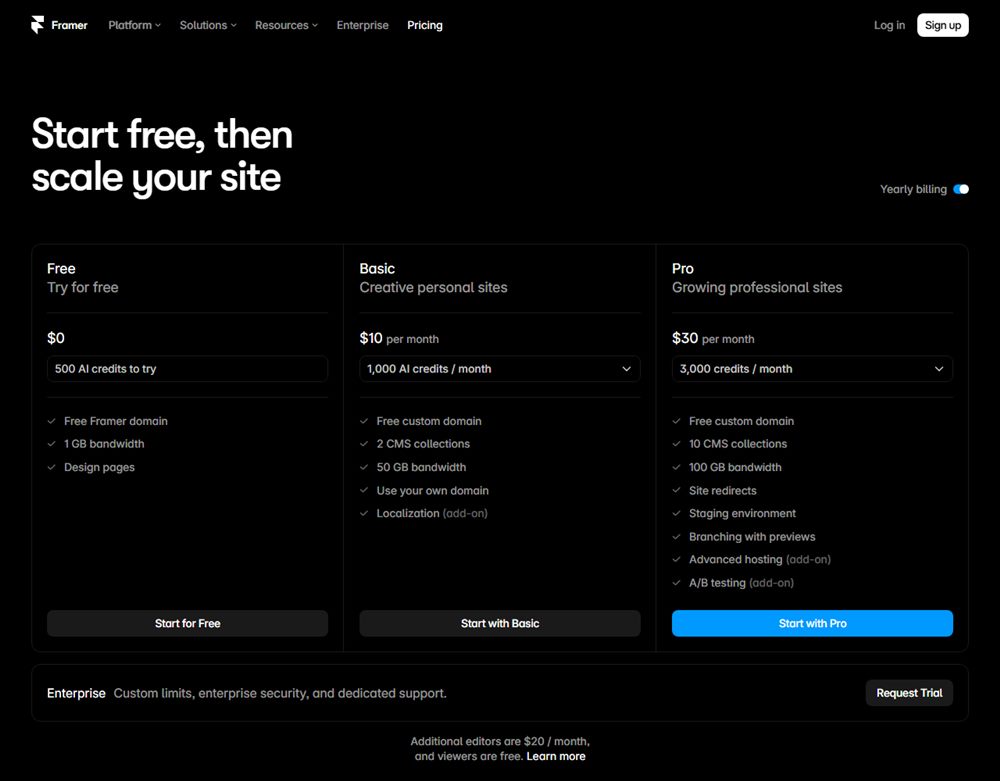
The $10 figure (Basic, billed yearly) is an entry fee, not a bill. Framer publishes a limits table under its plan cards, and it is the part of the pricing page worth reading twice.
| Limit | Basic ($10 / mo, yearly) | Pro ($30 / mo, yearly) | Beyond Pro |
|---|---|---|---|
| Site pages | 30 | 150 | $20 per 100 pages, 700 max |
| CMS collections | 2 | 10 | $40 per 10, 40 max |
| CMS items | 1,000 | 2,500 | $20 per 10,000, 40,000 max |
| Bandwidth per month | 50 GB | 100 GB | $40 per 100 GB, 2 TB max |
| CDN locations | 20 | 300+ | All |
| Analytics history | 30 days | 90 days | Unlimited |
| Additional editors | $20 / mo each | $20 / mo each | Custom |
| Site redirects, staging, branching | Not included | Included | Included |
Read it against the one-page site and a pattern appears: almost nothing in the table applies. Thirty pages, two collections and a thousand CMS items are irrelevant to a site with one page and no CMS. Fifty gigabytes of bandwidth is generous for a portfolio. The 20-location CDN on Basic versus 300 on Pro is the one line that touches a small site, and only if your visitors are far from those 20 locations. In other words, for a one-page site you are paying Framer for a meter that never moves. That is the verdict: the platform's price is justified by the platform's features, and a one-page site uses none of them.
For a multi-page site the same table reads the other way. Redirects arrive only at Pro, which matters if you are moving an existing site and want old URLs to keep resolving. Staging and branching are Pro as well. Anyone budgeting Framer for a real marketing site should budget $30 a month on yearly billing, not $10, and then add editors.
Which loads faster, Carrd or Framer?
By weight, Carrd, and it is not close. I ran Lighthouse 12 in its mobile profile against three official Carrd template demos and three templates from Framer's own marketplace, in a single session on one connection, September 12, 2026. That connection runs through a tunnel that adds latency, so the paint timings below are noisy: the same Carrd template posted a Largest Contentful Paint of 4.0 seconds in an earlier session and 8.8 seconds in this one. The columns that do not move with network noise are transfer size, request count, JavaScript transferred and Total Blocking Time, and those are the ones this comparison rests on.
| Builder | Template | Transferred | Requests | JavaScript | Total Blocking Time | LCP (noisy) |
|---|---|---|---|---|---|---|
| Carrd | Designer Portfolio | 289 KB | 12 | under 2 KB | 0 ms | 8.8 s |
| Carrd | Freelancer Portfolio | 314 KB | 16 | under 2 KB | 0 ms | 2.8 s |
| Carrd | Simple Creative Portfolio | 115 KB | 7 | under 2 KB | 50 ms | 1.3 s |
| Framer | Aerra | 2.76 MB | 82 | 354 KB | 390 ms | 6.7 s |
| Framer | Ashervale | 1.28 MB | 61 | 534 KB | 1,330 ms | 7.7 s |
| Framer | Artemis | 2.63 MB | 74 | 367 KB | 340 ms | 2.8 s |
The JavaScript column is the whole story. A Carrd page ships almost none, because a static page has nothing to boot. A Framer page ships 354 to 534 KB of it, because a server-rendered React page still has to load React and hydrate before it is interactive, and that is where the 340 to 1,330 ms of main-thread blocking comes from. Framer's infrastructure page is accurate about what it does well, including the AVIF images and the HTTP/3 edge, and none of it changes the fact that a Framer template transfers between four and twenty-four times the bytes of a Carrd one.
Does that matter for your visitors? On a portfolio, probably less than the numbers suggest; a 2 MB page on a good phone connection is fine. It matters for the claim. If someone tells you Framer is the faster choice because it is the professional one, the measurement says otherwise for this size of site.
Which one lets you back out
Framer, clearly. Its refund policy states: "You are entitled to a refund if you cancel your subscription within 7 days of the initial purchase." EU and Turkey residents get 14 days. After that, "Refunds are not provided for unused time remaining in an active subscription term", so a yearly plan cancelled in month three runs out the year. Carrd's Terms of Use go the other way: Carrd is not required to provide a refund for any reason, and its 7-day Pro trial is the only safety net. Pay Carrd $19 and consider it spent; pay Framer $120 for a yearly plan and you have a week to change your mind.
Leaving is the same on both sides. I did not find an official feature on either platform for exporting a published site to host elsewhere. Carrd documents transfers between Carrd accounts; Framer's help center covers cancelling a plan, which leaves the site on the free tier with Framer branding. Either way, moving to a different builder means rebuilding, which is the strongest argument for choosing correctly the first time.
Design control, sized correctly
Framer wins this category, and the win is real. It is a freeform canvas in the tradition of design tools, with components, breakpoints, animations and a CMS that can drive layouts. Carrd is a block editor: you stack elements in a column, style them, and on the Pro tiers add custom code and embedded scripts. A capable person can push Carrd surprisingly far, but the ceiling is a single vertical page built from Carrd's element types.
The question is when that gap gets cashed in. On a one-page portfolio, the difference between the two is mostly motion and polish, which is worth something and worth less than $100 a year to most people. On a brand site with a dozen pages, a blog feeding a CMS collection and a second editor, the gap is the product, and Carrd is not in the running at all.
Carrd vs Framer verdict: which to pick
| Your site | Pick | Why | Year one |
|---|---|---|---|
| Portfolio, landing page, link-in-bio, waitlist, event page | Carrd | One URL is the correct shape; Framer's meter never moves | about $30 |
| Marketing site with several pages, or anything with a blog | Framer | Pages and CMS are the product; Carrd cannot build it | $120 on Basic, $360 on Pro (yearly billing) if you need redirects or staging |
| Client work: many small one-page sites | Carrd | $19 covers ten sites; Framer bills per site | $19 for up to 10 sites, plus domains |
| A team of two or more editing the site | Framer | Carrd has no collaboration model; Framer's is $20 per extra editor | $120 + $240 per extra editor |
| "One page now, more later" | Decide now | There is no upgrade path between them; pick for the site you will have in twelve months | Whichever you pick, you pay once |
FAQ
Is Framer better than Carrd?
For a site with two or more pages, a blog, or a team editing it, yes. For a one-page site, no: Carrd costs $19 a year against Framer's $120 billed yearly, and its pages are lighter.
Can I use Framer for free with my own domain?
No. Framer's free plan publishes to a Framer domain with a "Made in Framer" badge, and Framer's pricing FAQ says you need to upgrade to a paid plan to connect a custom domain. The free plan is still useful as a design tool: you can build the whole site, keep it unpublished or on the Framer domain, and pay only when you are ready to go live on your own name. Basic on a yearly plan includes the first year of a domain, registered through Hover, which then renews at the standard rate.
Does Framer charge per page?
Not on Basic, which caps a site at 30 pages. On Pro the cap is 150 pages, after which Framer lists $20 per additional 100 pages up to 700.
Which is faster, Carrd or Framer?
By page weight, Carrd. In our same-session Lighthouse runs, three Carrd templates transferred 115 to 314 KB with 7 to 16 requests; three Framer templates transferred 1.28 to 2.76 MB with 61 to 82 requests and 340 to 1,330 ms of main-thread blocking.
Can I get a refund from Carrd or Framer?
Framer refunds if you cancel within 7 days of the initial purchase (14 days for EU and Turkey residents), but not for unused time later in the term. Carrd's Terms of Use say it is not required to provide a refund for any reason.
The one question that settles Carrd vs Framer
Not "how much design control do I want", which is the question both products would like you to ask, but "how many URLs will this site have a year from now". Count them before you open either checkout. One URL: Carrd, and keep the $100. Two or more: Framer, and budget for Pro if you need redirects. If you cannot answer, the free Framer plan lets you design without paying, and Carrd's free plan lets you publish three sites on a Carrd address, so you can build both before you commit. For the fuller picture of what the cheaper side gives up, our Carrd review goes through it line by line.
Sources
- Framer pricing (plans, limits, add-ons, editor pricing, FAQ on limits and the free plan)
- Framer Help: Refund policy
- Framer Help: Subscription pricing and charges
- Framer Help: Guide to Framer's hosting infrastructure
- Framer Updates: Free custom domains
- Framer Help: Removing the "Made in Framer" badge
- Carrd Pro plans and Carrd documentation: Pro plans
- Carrd Terms of Use
- Carrd: The Making Of
- Porkbun .com pricing
- Lighthouse 12 runs, September 12, 2026, on template demos from carrd.co and framer.website