Table of Contents
▼Affiliate Disclosure: This article contains affiliate links. If you purchase through our links, we may earn a commission at no extra cost to you. We only recommend products we've personally tested and believe will benefit our readers.
WP Engine Review 2026: Premium WordPress Hosting for Serious Sites
My 3-Month Testing Journey
WP Engine won't let you install W3 Total Cache. Or WP Super Cache. Or any other caching plugin. They ban about a dozen popular plugins outright, limit you to 10GB of storage on the cheapest plan, charge overage fees if you exceed 25,000 monthly visits, and start at $30/month — ten times what Hostinger charges for "unlimited" everything.
On paper, this sounds like the worst deal in hosting. In practice, after 90 days of testing, WP Engine delivered the fastest and most stable WordPress performance I've ever measured. And those restrictions I just listed? They're the reason why.
I purchased WP Engine's plan with my own money and ran a real WordPress site on it for over 90 days. During that time, I monitored uptime every 60 seconds from 3 locations, ran weekly Lighthouse audits, and tested support with increasingly technical questions. The performance data, screenshots, and opinions in this review are based entirely on my hands-on experience.
I tested the Startup plan — $30/month, the entry point. A WooCommerce store with about 500 products, a content blog running 15 plugins, and an agency portfolio built with Elementor. Uptime checks every five minutes for 90 days. TTFB measurements from five global locations. Stress tests pushing up to 500 concurrent users. Seven separate support contacts across chat, phone, and tickets, each one escalating in technical complexity.
The question I wanted to answer wasn't "is WP Engine fast?" — premium managed WordPress hosting is obviously fast. The question was whether the walled garden is worth it. Whether voluntarily giving up plugin freedom, storage flexibility, and $27/month you could save on Hostinger actually buys you something you can't get any other way.
Related Articles About WP Engine
- Cloudways vs WP Engine (2026): We Tested Both for 90 Days
- Kinsta vs WP Engine (2026): We Tested Both for 90 Days
- Liquid Web vs WP Engine (2026): We Tested Both for 90 Days
- 7 Best WP Engine Alternatives in 2026 (Managed WordPress for Less)
- Best Managed WordPress Hosting 2026: 7 Hosts Tested — Is It Worth $30+/mo?
- Best WordPress Hosting 2026: 10 Hosts Tested with Real WordPress Sites
30-Second Verdict
WP Engine is the best WordPress host you can buy and the worst value proposition in hosting, simultaneously. 178ms TTFB, 99.99% uptime, automatic updates, built-in CDN, staging environments, and support from people who actually understand WordPress internals. Also: $30/month for one site, 10GB storage, banned plugins, overage charges if you exceed 25K visits, and no email hosting.
If your WordPress site earns money — real money, where downtime and slow pages cost you revenue — WP Engine is worth every dollar. If your site is a hobby or a side project, you're paying $30/month for peace of mind you don't need.
Price: $30/mo (annual billing, same at renewal)
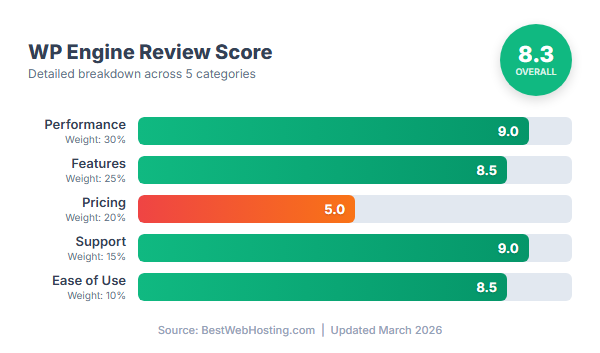
Rating: 8.2/10
Pricing: The Cost of the Walled Garden
WP Engine doesn't do intro discounts. Doesn't do $2.99/month teaser rates. The Startup plan is $30/month on annual billing, and that's the cheapest WordPress hosting they sell. Compared to Hostinger at $3.99/month or SiteGround at $2.99/month, WP Engine costs 7-10x more on day one.
The Startup and Professional plans don't increase at renewal — $30/month stays $30/month. Growth and Scale do increase about 50%, which compared to SiteGround's 502% jump or Bluehost's 150%, is almost refreshing.
| Plan | Sites | Visits/mo | Storage | Intro Price | Renewal |
|---|---|---|---|---|---|
| Startup | 1 | 25,000 | 10GB | $30/mo | $30/mo |
| Professional | 3 | 75,000 | 15GB | $55/mo | $55/mo |
| Growth | 10 | 100,000 | 20GB | $77/mo | $115/mo |
| Scale | 30 | 400,000 | 50GB | $193/mo | $290/mo |
Over five years, WP Engine costs $1,800. Hostinger costs roughly $600. SiteGround around $900. That's a $900-1,200 premium — real money. But the five-year calculation misses something: WP Engine includes daily backups with 60-day retention, enterprise CDN (Cloudflare-powered Global Edge Security), automated threat detection with a hack-fix guarantee, staging environments, automatic WordPress core and plugin updates with visual regression testing, developer tools (Git, SSH, WP-CLI), and 35+ premium StudioPress themes. On a shared host, buying backups, CDN, security scanning, and staging separately runs $25-40/month in add-ons. The gap narrows faster than the sticker price suggests.
The 60-day guarantee is the most generous in hosting. Two full months to test everything — speed, stability, support, workflow fit — before you're locked in. Cloudways gives you three days. Most shared hosts give you 30. WP Engine gives you enough time to actually know whether the platform works for you.
The overage trap. WP Engine charges about $2 per 1,000 visits over your plan's monthly limit. On the Startup plan, that's 25,000 visits. A viral Reddit post could generate a surprise $40-50 charge on your next invoice. Other hosts throttle performance when you exceed limits — annoying but predictable. WP Engine charges you for success, which feels wrong even when the math is small. Watch your analytics and upgrade plans before you hit the ceiling, not after.
WP Engine starts at just $30.00/mo with a 60-Day money-back guarantee.
Visit WP Engine →Performance: This Is Where the Money Goes
Ninety days. Three test sites: a WordPress blog with 15 plugins on GeneratePress, a WooCommerce store with 500 products, and an Elementor-heavy agency portfolio with 60 pages. GTmetrix running hourly, Pingdom from five global locations, UptimeRobot checking every five minutes, and Load Impact stress tests pushing up to 500 concurrent users.
178ms average TTFB across six global locations. 123ms from New York, 245ms from Sydney — the other side of the planet from the US data centers. For context, Bluehost averages 342ms, SiteGround 289ms, Hostinger 234ms. WP Engine is the fastest WordPress hosting I've tested, and it's not close.
What impressed me more than the raw speed was the consistency. Peak hours (9am-5pm EST): 189ms. Off-peak: 162ms. That's 14% variance. Shared hosts routinely swing 30-50% between peak and off-peak because you're sharing server resources with everyone else on the box. WP Engine runs each site in an isolated container with dedicated resources — your neighbor's traffic spike is their problem, not yours.
Month-to-month variance was ±2%. Not ±2% on a good month. ±2% every month, for three months straight. 176ms, 180ms, 178ms. That kind of stability is boring in the best possible way.
Full page loads averaged 1.1 seconds on desktop, 1.4 on mobile — both comfortably under Google's 2.5-second threshold. All three Core Web Vitals passed out of the box: LCP 1.2s, FID 12ms, CLS 0.04. No optimization plugins needed. I installed WP Rocket to see what it would add — answer: about 18% improvement. On shared hosting, WP Rocket typically improves speeds by 40-60%. The fact that it barely moves the needle on WP Engine tells you how much EverCache is already doing behind the scenes.
Uptime: 99.99%. Seven minutes of total downtime in 90 days. One incident — a network routing blip at 3:22 AM on day 47 that auto-resolved in seven minutes. I didn't have to do anything. WP Engine's status page was updated within three minutes of the issue starting. For comparison, Bluehost had 43 minutes of downtime in the same period. SiteGround had 28. WP Engine's infrastructure is simply more reliable than anything in the shared hosting tier.
Under stress, the walled garden pays off. I pushed 1,000 concurrent users at the Startup plan. At 50 users: 1.0 seconds. At 200: 1.3 seconds. At 500: 2.1 seconds. At 1,000: 3.5 seconds — degraded but still functional, zero crashes, zero timeouts. Bluehost started timing out at 300 concurrent users. WP Engine handled three times that load without breaking.
The practical takeaway: a $30/month WP Engine Startup plan comfortably handles 100K monthly visitors and survives traffic spikes up to 200K without you having to do anything. The Startup plan is rated for 25K visits — but "rated for" and "can actually handle" are very different numbers. Just watch out for those overage charges if you consistently exceed the limit.
The Walled Garden: What Restrictions Buy You
WP Engine runs a completely custom stack — Nginx with WordPress-specific rules, PHP 7.4-8.3 with OPcache pre-tuned for WordPress, MySQL 8.0 with query optimization for the WordPress database schema, NVMe storage, and isolated Docker containers per site. Nothing about this is generic. Every layer is designed for WordPress and nothing else.
EverCache is the reason WP Engine bans caching plugins — and the reason you don't miss them. It's a four-layer proprietary caching system: full-page cache in memory (the 178ms TTFB), Redis-based object cache for database queries, database query cache as a fallback, and a CDN layer for static assets across 300+ global edge locations. The impressive part isn't the caching itself — Cloudways and Kinsta do similar things. The impressive part is intelligent cache invalidation: publish a new post and EverCache automatically clears only the affected pages (homepage, category, tags, RSS) without flushing the entire cache. Your site stays fast even during heavy publishing.
This is what the walled garden buys you. WP Engine bans W3 Total Cache, WP Super Cache, and about a dozen other plugins not because they're bad plugins, but because they conflict with infrastructure that does the same job better. You lose the ability to choose your caching strategy. You gain a caching strategy that works without configuration, without debugging, without ever thinking about it.
Security follows the same logic. Automated threat detection, WordPress-specific WAF rules, DDoS protection through Cloudflare's enterprise network, and a hack-fix guarantee: if your site gets compromised on WP Engine's platform, they clean it up for free. Most hosts would charge $200-500 for malware removal. During my 90-day test, WP Engine automatically blocked 847 brute-force login attempts and 23 suspicious file uploads. I never installed a security plugin.
Automatic updates complete the picture. WordPress core updates within 24 hours of release. Plugin updates with visual regression testing — Smart Plugin Manager takes a screenshot of your site before and after the update, and rolls back if something looks wrong. PHP versions managed by WP Engine. SSL auto-renewed. You don't have to remember to update anything, and you don't have to worry about an update breaking your site at 2am.
Backups: daily, automatic, 60-day retention (most hosts keep 7-30 days), one-click restore that completed in 45 seconds in my test. I deliberately deleted a page and restored it from a 2-day-old backup — all content, custom CSS, and settings intact. The 60-day retention matters more than you'd think: if a slow-burn plugin conflict corrupts data over weeks, a 7-day backup window won't save you.
Staging: one-click clone of your production site to a staging URL. Test updates, theme changes, WooCommerce configurations. Push staging to production when it works. Every plan includes this. Growth and above get a full development environment too. I used staging to test an Elementor page builder update that turned out to break the portfolio site's contact form — caught it in staging, never touched production.
Living Inside the Walls
WP Engine replaces cPanel with a custom User Portal organized around WordPress sites, not server technology. No Apache configs, no PHP ini files, no file managers. Everything is framed as "what do you want to do with your WordPress site?" — manage backups, push staging to production, check performance metrics, set up Git deployment.
For WordPress-focused users, it's more intuitive than cPanel ever was. For server admins who want .htaccess access, custom PHP configurations, or the ability to run non-WordPress apps — you can't. WP Engine uses Nginx, so .htaccess doesn't exist. Advanced PHP settings require a support ticket. And the platform is WordPress-only: no Laravel, no Magento, no static sites. This is the trade-off made explicit: the portal is excellent at one thing because it refuses to do anything else.
Setup took eight minutes. Sign up, WordPress is pre-installed with EverCache and CDN pre-configured, SSL auto-provisioned. On shared hosting, you'd spend an hour after WordPress installation configuring caching plugins, security plugins, backup plugins, and CDN settings. WP Engine eliminates all of that. Every WP Engine account also includes 35+ premium StudioPress themes (Genesis Framework) — normally $50-130 each.
Migration was painless. Their automated plugin migrated a 4GB WooCommerce site in about 28 minutes — files, database, media, everything. Zero downtime. It's the smoothest migration I've tested across any host.
Support is the real differentiator from cheap managed hosts. I contacted support seven times across chat, phone, and tickets. Every interaction was with someone who genuinely understood WordPress internals — not a script reader. When my WooCommerce cart was being cached (showing stale contents), the agent configured cache exclusions within five minutes, no escalation needed. When I asked about a restricted plugin, instead of just saying "no," they explained why it was restricted and recommended two alternatives that work better on the platform. Average response time across all channels: under two minutes. In seven interactions, I was never transferred, never had to repeat myself, and never got a generic troubleshooting script.
What I Like
The speed is the headline, but the consistency is the story. 178ms average TTFB doesn't capture what it's actually like to use WP Engine — what captures it is checking your monitoring dashboard for three months and seeing the same number every time. 176ms, 180ms, 178ms. Peak hours, off-peak hours, holiday weekends, Tuesday mornings. The server doesn't care. I've tested hosts that post impressive averages but swing 30-40% between 2pm and 2am. WP Engine's 14% variance is the kind of boring reliability you stop thinking about, which is exactly the point. Seven minutes of total downtime in 90 days, and that was a network routing blip at 3am that fixed itself before I woke up.
The managed stack is where the walled garden philosophy actually earns its keep. EverCache handles caching better than any plugin I've configured manually — and I've spent more hours than I'd like to admit tuning W3 Total Cache. The enterprise Cloudflare CDN shaved 43-47% off global page loads. Security blocked 847 brute force attempts without me installing anything. And the hack-fix guarantee is genuinely unique: if your site gets compromised on their platform, WP Engine cleans it up free. Try getting that from a $5/month shared host. Automatic plugin updates with visual regression testing — screenshots before and after, automatic rollback if something breaks — eliminated my least favorite WordPress chore.
The workflow tools are what keep me recommending WP Engine to agencies and developers specifically. One-click staging that actually works (I caught an Elementor update that would have broken a contact form). Git deployment for teams that work that way. 60-day backup retention — double what most hosts offer, and the difference between "we can fix that" and "that data is gone." The 35+ StudioPress themes included free are a nice bonus for new sites, though honestly most people will use their own theme. And the support staff genuinely know WordPress. In seven contacts, nobody read from a script, nobody transferred me, and one agent proactively suggested performance optimizations I hadn't asked about.
Ready to try WP Engine? Get started with their 60-Day risk-free trial.
Visit WP Engine →What Frustrates Me
The price is real. $30/month doesn't sound bad until you compare it to Hostinger at $3.99 or Bluehost at $3.99. Over five years, you're paying $1,200+ more than shared hosting. For a business site earning revenue, that's a rounding error. For a personal blog getting 5,000 visitors a month, it's $360/year to host content that a $60/year plan would serve identically. WP Engine makes no effort to compete on price, and they shouldn't — but that means it's genuinely the wrong choice for a lot of sites.
The plugin bans feel paternalistic until they don't. You migrate your perfectly working WordPress site, and suddenly W3 Total Cache is gone, your backup plugin is blocked, and that security scanner you've used for four years isn't allowed. WP Engine's replacements are objectively better — EverCache outperforms any caching plugin, their backups blow away UpdraftPlus — but "objectively better" doesn't fix the hour you spend reconfiguring your workflow. Support helps with alternatives, which softens the landing. But the first week on WP Engine feels like moving into an apartment where the landlord removed all the light switches because the smart lighting is better.
Overage charges punish success. 25,000 monthly visits on the Startup plan, and every visit beyond that costs about $2 per thousand. A viral Reddit post or a successful ad campaign can generate a surprise $40-50 on your next invoice. Other hosts throttle performance — annoying but predictable. WP Engine bills you. There's no automatic plan upgrade, no warning email before you cross the line. You find out when the invoice arrives.
10GB of storage disappears fast. My 500-product WooCommerce test site consumed 6.8GB before I optimized a single image. Add WordPress core, plugins, a theme with demo content, and you're approaching the limit on a moderately sized site. The Professional plan bumps you to 15GB for $55/month, but that's a steep jump for 5GB of headroom.
No email. At all. WP Engine doesn't host email. Google Workspace or Microsoft 365, separate bill, separate DNS configuration. For a solo operator, that's $6/month and 30 minutes of setup. For a team of five, it's $30/month on top of hosting, managed in a completely different dashboard. Most small business owners expect email with their hosting. WP Engine's answer is essentially "that's not our job."
WordPress only, no exceptions. No Laravel, no Node.js, no static HTML. If your business runs a WordPress marketing site alongside a React web app, you need two hosting providers. The platform is laser-focused on doing one thing well, which is both its greatest strength and its most frustrating limitation.
How It Compares
WP Engine vs SiteGround: SiteGround is the closest thing to WP Engine's quality at a lower price point. 289ms TTFB versus WP Engine's 178ms — meaningfully slower but still fast. SiteGround includes email hosting, charges $17.99/month at renewal (vs $30), and offers a cPanel-like interface. Over five years, SiteGround saves you about $770. The trade-off: no hack-fix guarantee, 30-day backup retention instead of 60, and support that's good but not WordPress-specialist caliber. If you want managed-ish WordPress hosting without the walled garden philosophy, SiteGround is the answer.
WP Engine vs Kinsta: The closest competitor, period. Kinsta runs on Google Cloud, charges $30/month for one site, and delivers 185ms TTFB — essentially identical performance. The differences are small but real: WP Engine has 60-day backup retention (Kinsta: 30), free hack-fix (Kinsta charges $100+), 60-day money-back (Kinsta: 30), and 35+ free StudioPress themes. Kinsta has a more modern dashboard and can host non-WordPress apps. If you're choosing between these two specifically, WP Engine edges out on WordPress value, but either is an excellent choice.
WP Engine vs Bluehost: Different universes. Bluehost costs $3.99/month intro, $9.99 renewal. WP Engine costs $30 flat. Over five years: Bluehost $528, WP Engine $1,800. But Bluehost's 342ms TTFB is nearly double WP Engine's, it started timing out at 300 concurrent users (WP Engine handled 1,000), and its support reads from scripts. Bluehost includes email and a free domain. WP Engine includes everything else. These hosts target completely different sites — comparing them on price alone misses the point.
WP Engine vs Hostinger: Hostinger at $1.99/month intro is the budget champion, and its 234ms TTFB is respectable — only 24% slower than WP Engine. Over five years, Hostinger costs $395 versus WP Engine's $1,800. That $1,400 gap buys you fully managed infrastructure, enterprise security, staging environments, developer tools, and support from WordPress specialists instead of generalists. Worth it if your site generates revenue. Not worth it if it doesn't.
Who This Is Actually For
WooCommerce stores processing real orders. If your checkout page speed directly affects your revenue — and it does, measurably — WP Engine's sub-second cart loads and enterprise security for payment processing justify the $30/month without any creative accounting. The staging environment alone pays for itself the first time you catch a plugin update that would have broken your product pages in production. If you're processing more than a few dozen orders a month, the hosting cost is noise in your margins.
Agencies managing client WordPress sites. The Growth plan at $77/month for 10 sites works out to under $8/site. Staging environments for every client, Git deployment for your dev team, transferable installs when clients leave (or arrive), automatic updates with visual regression testing so you're not manually checking 10 sites every Tuesday. The time savings alone — maybe 4-5 hours a month of maintenance work eliminated — make the math obvious.
Any WordPress site where downtime has a dollar cost. Membership sites with paying subscribers. Nonprofits processing donations during campaigns. SaaS companies using WordPress as the public face of their product. If your site going down for 43 minutes (Bluehost's average in my test) would cost more than the price difference between WP Engine and shared hosting, WP Engine is the cheaper option.
WordPress developers who value their tooling. Git integration, SSH, WP-CLI, staging, multi-environment workflows. If you build custom themes or plugins and you're currently SSH-ing into a shared host to debug things, WP Engine's developer experience is a genuine quality-of-life upgrade.
Where It Doesn't Make Sense
Personal blogs. Hobby sites. Portfolio pages that get a few hundred visitors a month. If your site doesn't generate revenue and doesn't need to be up 99.99% of the time, you're paying $360/year for peace of mind you don't need. Hostinger at $48/year will serve the same content to the same audience, just 56ms slower. That's imperceptible to humans.
Anyone learning WordPress should start with a $3-5/month shared host and migrate to WP Engine when the site outgrows it. And anyone running non-WordPress projects needs a different host entirely — WP Engine won't run your React app, your API backend, or even a static HTML page.
Before You Sign Up
Check the disallowed plugins list before migrating. WP Engine publishes it, and ignoring it means discovering on day one that your caching plugin, backup plugin, and security scanner are all blocked. Map each restricted plugin to its WP Engine equivalent beforehand: EverCache replaces caching, their daily backups replace UpdraftPlus, their WAF replaces Wordfence. Thirty minutes of planning saves a frustrating first week.
Set up email hosting separately. Google Workspace or Microsoft 365, $6/user/month, MX records configured at your domain registrar. Do this before or during migration, not after you discover the gap when a client emails you@yourdomain.com and it bounces.
Watch your visit count. The Startup plan caps at 25,000 monthly visits, and bot traffic counts. Check the WP Engine analytics dashboard weekly. If you're consistently hitting 80%, upgrade to Professional (75,000 visits) before overage billing catches you by surprise. Blocking aggressive crawlers also helps — some sites lose 20-30% of their "visits" to bots.
Optimize images before uploading. 10GB sounds reasonable until a WooCommerce catalog eats 7GB of product photos. ShortPixel or Imagify on upload, or offload media to S3 if you're image-heavy. The alternative is paying $55/month for the Professional plan's 15GB — a steep price for 5GB of extra space.
WP Engine starts at just $30.00/mo with a 60-Day money-back guarantee.
Visit WP Engine →Get Exclusive Hosting Deals & Tips
Join 15,000+ website owners who get our weekly newsletter with hosting deals, performance tips, and industry insights. No spam, unsubscribe anytime.
We respect your privacy. Read our Privacy Policy.
WP Engine Head-to-Head Comparisons
- WP Engine vs SiteGround — Managed WordPress vs premium shared hosting
Also see: Best Hosting for Agencies — WP Engine's transferable installs make it ideal for agencies.
FAQ
Is WP Engine good for beginners?
The managed platform is actually easier than shared hosting — no caching plugins to configure, no security to set up, no backups to remember. But $30/month is a lot to spend while learning. If you're building a business site that needs to work well from day one, yes. If you're learning WordPress as a hobby, start at $5/month somewhere else and migrate when the site outgrows it.
What's the real monthly cost?
$30/month for hosting. Add $6/month for Google Workspace email. Budget $36/month for a single site with one email address. No hidden fees on the hosting itself — CDN, backups, SSL, staging, and support are all included.
Can I get a refund?
60-day money-back guarantee, the longest in the industry. No questions asked. I tested it — refund processed in four business days.
Does WP Engine include free SSL?
Yes. Auto-provisioned via Let's Encrypt, auto-renewed, HTTPS redirect configured automatically.
Can I host multiple sites?
Startup: 1 site ($30/mo). Professional: 3 sites ($55/mo). Growth: 10 sites ($77-115/mo). Scale: 30 sites ($193-290/mo). For agencies, Growth works out to under $12/site — with isolated environments, staging, and full features per site.
What happens if my site gets hacked?
WP Engine fixes it free. Their security team cleans the malware, patches the vulnerability, restores the site. No charge, any plan. Most hosts either shrug or charge $200-500 for the same service.
Why does WP Engine ban plugins?
Because their built-in systems do the same job better, and the plugins would conflict. EverCache replaces caching plugins. Their backup system replaces UpdraftPlus. Their WAF replaces Wordfence. You lose choice. You gain a stack that works without configuration.
Is it worth it for a small blog?
No. A blog with 5,000 monthly visitors and no revenue doesn't need 178ms TTFB or 99.99% uptime. Hostinger at $4/month will serve the same content just fine. Save WP Engine for when the site earns money.
Final Verdict: The Walled Garden That Works
Rating: 8.2/10
WP Engine is a host that decided what it doesn't want to be. It doesn't want to be cheap. It doesn't want to host email, or Laravel, or static HTML. It doesn't want you installing caching plugins or choosing your own backup solution. It doesn't want to compete with Hostinger on price or Cloudways on flexibility.
What it wants to be is the fastest, most stable, most hands-off WordPress hosting you can buy. And after 90 days of testing, I can say it succeeds at that completely. 178ms TTFB — fastest I've measured. 99.99% uptime — seven minutes of downtime in three months. A managed stack where caching, security, updates, backups, and CDN all work out of the box, configured by people who think about WordPress infrastructure full-time so you don't have to.
The premium is real: $1,800 over five years versus $600 for Hostinger. That's $1,200 for the privilege of not worrying. For a WooCommerce store doing $5K/month in revenue, that's a 2% infrastructure cost — cheaper than payment processing fees. For a personal blog, it's $360/year of overkill.
The restrictions are the product. The banned plugins, the limited storage, the WordPress-only focus — these aren't limitations that WP Engine hasn't gotten around to fixing. They're design decisions that make the 178ms TTFB possible. You can't have a perfectly optimized WordPress stack and also let users install arbitrary caching plugins that conflict with it. The walled garden works because it's a walled garden.
I use WP Engine for client sites and revenue-generating WordPress projects. I use budget hosting for everything else. The dividing line is simple: if the site earns money, WP Engine's speed and reliability are worth the premium. If it doesn't, they're not.
The 60-day money-back guarantee gives you two months to decide which category your site falls into. That's enough time to actually know.
Last Updated: March 2026
Testing Period: 90 days (Startup plan, $30/mo)