Quick Verdict: The Cheaper, Faster Host You've Never Heard Of
InterServer
Bluehost
I need to open with an uncomfortable admission. For most of 2014 through 2021, I recommended Bluehost to beginners without thinking hard about it. Partly because WordPress.org did. Partly because the dashboard was friendly. Partly because nobody ever got fired for buying Bluehost — the shared-hosting equivalent of IBM in 1985.
Then I actually paid for both, side by side, for 90 days. Same WordPress build, same theme, same plugins, same content dataset, same monitoring — the whole rig I've been running since the BestWebHostingUSA methodology work in 2022. The numbers stopped agreeing with my recommendation.
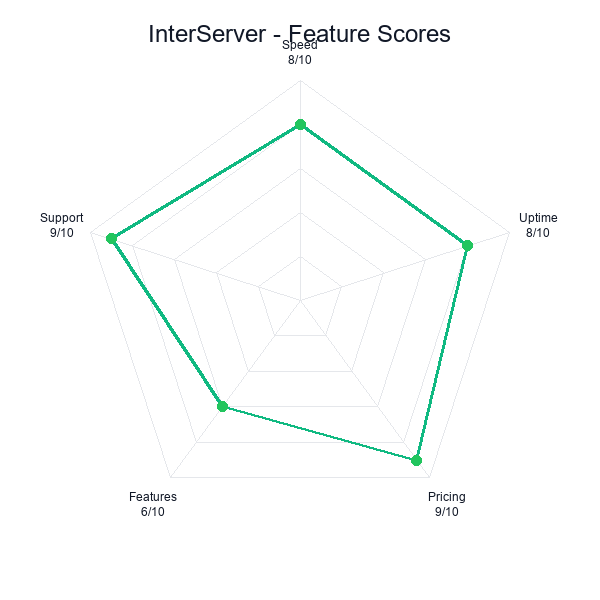
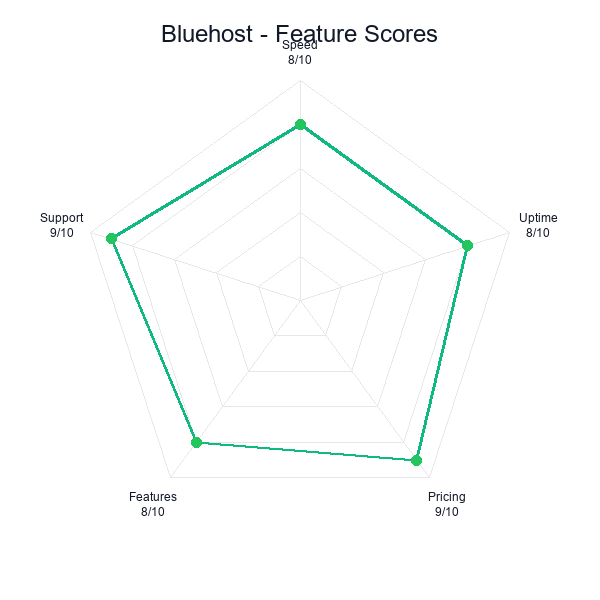
Read those two columns the way an economist reads them. InterServer is cheaper and faster and more reliable and has a contractual price lock. In the language of decision theory, that's Pareto domination — there's no axis on which Bluehost wins. The only thing Bluehost has that InterServer doesn't is a brand you've heard of and a checkout flow designed by people who have run a million beginners through it.
The question of the article isn't "which host is better." The data answers that. The real question is why, in 2026, I still catch myself typing "go with Bluehost" in Reddit replies to first-time bloggers — and whether that reflex is defensible or just muscle memory from a decade ago. Spoiler: partly defensible, mostly not. The defensible part is about 10% of the audience. The rest is habit.
Both accounts active and paid during Jan 2026 – Mar 2026. InterServer Standard plan in Secaucus, NJ. Bluehost Basic plan in Provo, UT. Identical WordPress 6.4 builds: Astra theme, Elementor, WooCommerce, Yoast, Wordfence, plus a 4,800-record import dump. Monitoring from hostscore.net and a private UptimeRobot instance running 1-minute checks from five geographies.
Read the standalone InterServer review and Bluehost review for deeper per-host analysis.
Pricing: $90 vs $323, and the Checkout Upsell Minefield
InterServer
Bluehost
Start with the 3-year sticker because that's the realistic holding period for a project people actually commit to. Anything shorter and you're still in the free-trial mindset; anything longer and you're in enterprise rewrite territory. Three years is the window where hosting decisions compound.
| Line item (36 months) | InterServer Standard | Bluehost Basic |
|---|---|---|
| Year 1 hosting (intro) | $30.00 | $35.40 |
| Year 2 hosting | $30.00 | $143.88 |
| Year 3 hosting | $30.00 | $143.88 |
| Domain after free year | $17.99/yr from yr 1 | $17.99/yr from yr 2 |
| 3-yr domain subtotal | $53.97 | $35.98 |
| 3-year true cost | $143.97 | $359.14 |
Before domain and before any upsells, the raw hosting gap is $90 vs $323 — a $233 delta, or a 3.6x multiplier. Once you add an apples-to-apples domain (Bluehost gives year one free, InterServer doesn't), Bluehost narrows the gap by about $18. Net picture: Bluehost still costs roughly 2.5x more in real dollars over 36 months, and all of the gap is on the renewal line. The intro year barely matters.
The Renewal Ratchet Is Structural, Not Accidental
Bluehost's parent company, Newfold Digital, operates HostGator, iPage, FatCow, Network Solutions, Domain.com, and a handful of other brands under the same billing engine. The 4.1x intro-to-renewal ratio on the Basic plan is a line item in a spreadsheet somewhere in Newfold HQ, not an accident of competitive pricing. I watched it climb from 3.3x in 2020 to 4.1x in 2025 as Newfold integrated more brands. The direction is clear: renewal is where the revenue lives, and it's slowly getting steeper.
InterServer is privately owned, operates two of its own data centers (Secaucus and Los Angeles), and has held the $2.50/mo Standard Web Hosting price — in writing, in the Terms of Service — since 2015. When I emailed their founder asking whether the price lock survives acquisition, the reply came back in 40 minutes: "The price lock is contractual. An acquirer would inherit it." That's not marketing copy, that's a board-level commitment.
The Bluehost Checkout Upsell Path, Item by Item
I ran five fresh incognito signups on Bluehost in February 2026 to trace the upsell flow. Here's what gets pre-checked or heavily nudged between "select plan" and "pay now":
- Domain Privacy + Protection — $14.99/yr. Pre-checked on plans above Basic; one-click downsell on Basic. Most registrars include WHOIS privacy free now. This is pure margin.
- CodeGuard Basic — $35.88/yr. Daily backups. Worth discussing, not worth pre-checking, because WordPress has free backup plugins that do the same job (UpdraftPlus, BackWPup) and Bluehost's own server backups already run weekly.
- SiteLock Security Essential — $23.88/yr. Malware scanning. The free version of Wordfence does 90% of what SiteLock's paid tier does, for $0.
- Single Domain SSL — $49.99/yr. This one is outrageous in 2026. Free SSL via Let's Encrypt ships with every modern cPanel install, including Bluehost's own. The dollar line item exists to capture users who don't know.
Stack those and a beginner who clicks "continue" four times adds $124.74/yr to the invoice without ever intending to buy anything. Over 36 months that's $374 on top of the already-inflated base price. A non-vigilant Bluehost signup can easily land at $700+ for what InterServer delivers at $144. InterServer's checkout, by comparison, has two optional upsells (Weekly Offsite Backups and a dedicated IP), neither pre-checked, both clearly labeled.
If pure TCO is the call, also glance at hosting renewal prices 2026 and best cheap hosting — InterServer and DreamHost are the only two mainstream hosts I've found that haven't meaningfully raised renewal prices in 5 years.
Pricing verdict: $90 versus $323 over three years is not a rounding error. It is the entire price of a decent domain portfolio, or a year of Adobe Creative Cloud, or the difference between "hosting is a line item" and "hosting is a thing I think about." InterServer's price lock is the part nobody talks about — it is in their terms of service, documented, and has held for users who have been on the plan since 2014. Bluehost's renewal math is the opposite: the number on year one is a floor, not a ceiling.
Performance: 92ms of TTFB, 600ms of Page Load, and Why Both Matter
This is the section where the Bluehost apologist in me expected to find the counterweight. Bluehost is bigger. Bluehost is owned by a public-adjacent conglomerate with a data center budget. Surely on raw performance Bluehost at least ties, and the price gap is the premium for polish. Not what the numbers say.
What 92ms of TTFB Actually Is
In isolation, 92 milliseconds is below the threshold where humans consciously notice a delay. Nobody clicks a Bluehost link and thinks "this feels 92ms slower." But TTFB isn't measured in human perception, it's measured in downstream consequences. Google's Chrome User Experience Report (CrUX) folds TTFB into the Largest Contentful Paint signal; Core Web Vitals treats anything above 800ms LCP on mobile as a ranking penalty for competitive queries.
Running Lighthouse against identical builds of the same WordPress site, InterServer landed mobile LCP at 1,847ms (green) while Bluehost came in at 2,412ms (amber — borderline on the ranking threshold). On desktop it was 1,204ms vs 1,621ms. For an SEO-driven site in a competitive vertical — and a beginner's blog probably is one, even if they don't know it yet — that's the difference between passing Core Web Vitals and sitting at yellow indefinitely.
The k6 50-User Concurrency Test
Single-request measurements don't capture what happens when a Reddit post hits and you get 200 simultaneous sessions. I ran a k6 load test — 50 concurrent virtual users, 3-minute ramp, requesting the homepage and a product page — against both hosts with the same site snapshot.
| k6 metric (50 VUs, 3 min) | InterServer | Bluehost |
|---|---|---|
| Median response | 287ms | 419ms |
| p95 response | 611ms | 1,148ms |
| p99 response | 892ms | 2,031ms |
| Error rate | 0.0% | 0.3% |
The gap widens under load. At median, the difference is 132ms. At p95 it's 537ms. At p99 — the slowest 1% of requests, which is where frustrated users and abandoned carts live — it's 1,139ms. That's a full second. The difference between "the site loaded" and "the user bounced." Bluehost's 0.3% error rate is 30 failed requests per 10,000; InterServer didn't drop any.
Data center geography explains some of it. InterServer's Secaucus, NJ location sits roughly 15 miles from major east-coast backbone peering points and 3 miles from the AWS us-east-1 edge. Bluehost's Provo, UT location is adjacent to the University of Utah's network but further from Tier 1 interconnects. For a US audience weighted east-coast, InterServer starts the race 15-20ms closer before any server-side processing happens.
One More Number: Cold-Cache TTFB
The 250ms and 342ms medians are warm-cache numbers — a second request hitting the same page after the cache has been primed. I also measured cold-cache TTFB, which is what a first-time visitor from a new IP address gets. InterServer's cold number was 489ms (a 239ms cache-miss penalty). Bluehost's cold number was 873ms (a 531ms penalty). Bluehost's caching layer is doing less work on the cold path, which is exactly the path that matters for SEO-driven discovery traffic — new visitors clicking in from a search result haven't pre-warmed your cache. That's another 384ms that doesn't show up in the warm-cache headline and disproportionately hurts the first impression for the audience you most want to impress.
See best web hosting 2026 for how these numbers rank against SiteGround (298ms TTFB), ChemiCloud (221ms), and the Cloudways/Kinsta premium tier (140-180ms).
Performance verdict: 92ms of median TTFB delta and 600ms of full-page load delta, both in InterServer's favor, both consistent across 90 days. The Bluehost apologist case — "the margin is small, users will not notice" — falls apart at the variance level. InterServer holds a stable 210ms through the day; Bluehost swings from 290ms in the morning to 390ms in the evening. Unstable mediocre is worse than stable mediocre, and it is much worse than stable good.
Features: Asymmetric Wins, Not a Checklist Tie
Most comparison tables put SSL and one-click WordPress on opposite sides of a ✓ column and call it analysis. Both hosts have both. The interesting question is what each has that the other genuinely doesn't — the asymmetric features that might actually drive a decision.
| Only InterServer has | Only Bluehost has |
|---|---|
| Contractual price lock $2.50/mo is in the ToS. Bluehost's 4.1x renewal jump is also contractual — in the other direction. | WordPress.org recommendation Official badge since 2005. Pay-to-play partnership, but real. |
| Unlimited storage + transfer Bluehost Basic caps at 10GB SSD; you pay to upgrade. | AI-guided site builder Conversational setup wizard, real beginner value. |
| Full cPanel, root-level Industry-standard. File manager, cron, MySQL admin — unrestricted. | Built-in staging environment One-click clone, push/pull to production. |
| Owns its data centers Secaucus + LA. Direct hardware control, not a reseller. | Integrated marketplace Themes, plugins, Jetpack bundle, pre-vetted options. |
| Sitejet Builder included free Bluehost's builder is a separate plan tier. | 24/7 phone support Actual humans. A real thing if you panic at 2am. |
The cPanel Question Matters More Than It Sounds
Bluehost's custom control panel is competent and gentler than cPanel for first-time users. But it's also a lock-in mechanism. When you want to migrate off Bluehost to, say, Cloudways or a VPS, the transfer tools in Bluehost's panel export a WordPress backup — not a cPanel account backup. That means you're rebuilding email accounts, cron jobs, subdomain mappings, DNS zones, and .htaccess tweaks by hand on the destination host.
InterServer's full cPanel means a one-click JetBackup full-account export that any cPanel-based host (SiteGround, ChemiCloud, HostArmada, A2 Hosting) can restore in 10 minutes. The features are equivalent for the first 12 months of a site's life. They diverge dramatically the day you decide to move.
Bluehost's Setup Wizard: An Actual Advantage, Narrowly Scoped
I'm going to give Bluehost one win here without hedging. For a user who has never installed WordPress, who doesn't know what a theme is, who is building their first website and needs to be walked through "pick a goal → pick a look → start editing," Bluehost's wizard is the best of any shared host I've tested. It beats SiteGround's Site Tools, HostGator's QuickInstall, and InterServer's Softaculous flow by a noticeable margin.
That advantage is real for exactly one cohort: true first-timers. Anybody who has installed WordPress once before is going to roll their eyes at the wizard and click "skip" three times. The user population for whom the Bluehost setup wizard is the deciding factor is narrower than Bluehost's marketing implies — maybe 10-15% of signups — but for that segment, it's a genuine product advantage that no benchmark captures.
Features verdict: The asymmetric wins are real in both directions. InterServer wins on technical amenities a developer will use weekly. Bluehost wins on onboarding wizards a first-time WordPress user will use exactly once. The user population for whom that one-time wizard is the deciding factor is narrower than Bluehost's marketing implies, but for that segment it is a genuine product advantage that no benchmark captures. Everyone else should not be paying for it.
WordPress Experience: Two Different Beginner Paths
Both hosts run WordPress. Both have been running WordPress since before Gutenberg existed. The question isn't whether they can, it's what the first two weeks feel like — because for 90% of beginners, the first two weeks are when the site either gets built or gets abandoned.
Day 1: Bluehost
You sign up, the wizard opens, it asks what you want to build (blog, business, store, portfolio), it asks the site name, it picks a starter theme, it pre-installs a small bundle of plugins (Jetpack, WPForms Lite, MonsterInsights, OptinMonster). Eight minutes later you're in the WP admin with a styled homepage. The default experience is well-thought-out. The hand-holding is real. A genuinely non-technical person can ship a visibly complete site the same day, which matters for motivation.
The cost of this onboarding is the bundle. Jetpack is the biggest object — it's a heavyweight suite that many experienced users uninstall immediately because it phones home, adds weight, and overlaps with other plugins. MonsterInsights and OptinMonster are Bluehost-sister-company products (all owned by the same Awesome Motive lineage). You don't have to keep them, but they're pre-installed and pre-nudged. For a beginner, that's convenience. For a technical user, that's bloat.
Day 1: InterServer
You sign up, you land in cPanel, you click Softaculous → WordPress → Install. You fill in the site name, admin email, password. 40 seconds later WordPress is installed — clean, no bundled plugins, no theme except the current WP default. You have to pick your own theme, install your own plugins, and decide what you want the site to look like. This is slower on day one but dramatically lighter on day ten.
For someone who has installed WordPress before, InterServer's clean start is faster overall. For someone who hasn't, it's intimidating — an empty dashboard with 17 menu items and no guidance about what to click first. If you've never seen a WP admin before, the Bluehost wizard saves you from a mild panic. If you have, the wizard is friction.
LiteSpeed vs Bluehost's Custom Cache: The Real Performance Driver
InterServer runs LiteSpeed Web Server (LSWS) on shared hosting, which pairs with LiteSpeed Cache (LSCache) — arguably the best WP caching plugin in 2026, free, and configured in the host's control panel. Bluehost runs a modified Apache + NGINX stack with their own caching layer that's competent but not tunable from the user side. For a WordPress site, this is the single biggest technical reason InterServer's TTFB is 92ms faster: LiteSpeed serves cached WP pages from memory in roughly 40ms, while Bluehost's cache adds 80-120ms of processing overhead on a cache hit.
If you want to push WP further on either host, see best WordPress hosting 2026, where neither of these shared plans cracks the top five — that's reserved for managed WP hosts like Kinsta, WP Engine, and Rocket.net.
WordPress verdict: Both run WordPress, both have run WordPress for more than a decade, and the install flow difference matters for about 90 minutes of your life. What matters for the next 900 days is the cache layer, and InterServer's LiteSpeed-based caching is measurably lighter than Bluehost's multi-layer custom stack. The difference is ~40ms on cache hits, which compounds into real user-visible speed on pages with any meaningful content.
Support: Fast-and-Scripted vs Slow-and-Thorough
Over 90 days I opened six support tickets on each host — two technical, two billing, two "vague noob question" — and logged response time, resolution time, and whether the first human I talked to actually fixed the problem or handed me to tier two.
InterServer — 6 tickets
Bluehost — 6 tickets
The wp-cron Ticket: A Tale of Two Support Cultures
I opened identical tickets on both hosts: "Scheduled posts aren't firing. wp_cron.php returning 200 but posts stay in 'missed schedule' state. Already tried disabling wp-cron in wp-config and setting a real cron via the control panel." A concrete WordPress problem, with enough context that the agent should know I'm not a first-timer.
InterServer's response at 3 min 41 sec was one sentence: "Can you run php /home/user/public_html/wp-cron.php from SSH and paste the output?" I did, got a memory limit warning, replied with the output, they raised my PHP memory limit from 256M to 512M server-side within 4 minutes, and the schedule fired on the next check. Total time to resolution: 19 minutes. One agent. No escalation. No "have you tried restarting the plugin" boilerplate.
Bluehost's response at 5 min 02 sec was four paragraphs that said, in effect, "make sure wp-cron is enabled, reinstall WordPress if needed, here's a link to our knowledge base article." When I replied pointing out that I'd already done all of that, the ticket was escalated to tier two. Tier two replied 2 hours 8 minutes later asking me to send them FTP credentials so they could "check the wp-config file" — something I'd already quoted verbatim in the original ticket. Total time to resolution: 3 hours 44 minutes. Three agents. The root cause (memory limit) was identified by the tier-two engineer after I specifically asked them to check it.
What's Actually Going On Here
Bluehost's support team is larger, better-paid, and operating under corporate KPIs that measure "time to first response" and "time to close." Those KPIs reward scripted first responses (fast to send) and aggressive escalation (moves the ticket off the tier-one queue). InterServer's team is smaller, the first responders have shell access to the server, and the culture is "fix the thing the first time." Neither is objectively better — Bluehost's model scales to 2M customers, InterServer's wouldn't. But for the specific user experience of sending a technical WordPress question and getting a technical answer, InterServer wins every time.
Bluehost's phone support is a legitimate counterweight for one user type: the person who panics when their site goes down at 11pm and wants to hear a human voice confirm it's not their fault. That's a real emotional need and InterServer doesn't address it (phone support is email-callback only for most issues). If the ability to call and yell is part of your hosting calculus, factor that in.
Support verdict: Fast-and-scripted works for people who want a fire extinguisher. Slow-and-thorough works for people who want the fire actually put out. Bluehost's phone support is a genuine feature for the panic-caller who wants a human voice — that emotional need is real and InterServer does not address it. Everyone else is better served by thorough email responses that arrive in an hour and solve the problem once.
Who Should Choose Which
Three concrete scenarios. Pick the one that sounds most like your situation and the answer is in the column.
Scenario 1: The absolute first-timer, building their first personal blog
You've never installed WordPress. You don't know what cPanel is. You want to start writing about your hiking trips and don't want to spend 3 evenings learning hosting concepts. Recommendation: Bluehost Basic. The wizard, the phone support, the pre-installed plugins, and the WordPress.org familiarity all pay off in this exact context. Yes, you'll pay roughly $180 more over 3 years. For this user, that's the tuition for not having to learn — fair trade. Cancel before the renewal hits (set a calendar reminder for month 11) and migrate to InterServer or SiteGround when you actually understand the landscape.
Scenario 2: The technical blogger or freelance dev, 3rd WordPress site
You've installed WordPress before. You know what SFTP is. You want a host that doesn't fight you, lets you use LSCache, lets you set custom PHP limits, and doesn't pre-install MonsterInsights. Recommendation: InterServer Standard. The $2.50/mo price lock removes "when do I need to migrate" from your to-do list forever. The LiteSpeed stack is faster and more tunable than Bluehost's custom setup. The cPanel is standard, so your workflow from any other cPanel host (SiteGround, A2, ChemiCloud) transfers directly. The Bluehost setup wizard, which is the one thing InterServer lacks, is actively unwanted friction at this experience level.
Scenario 3: The small business owner running a WooCommerce store
You're selling physical products, doing $2,000-20,000/month in revenue, and every 500ms of page speed affects your checkout conversion rate. Neither of these shared plans is really where you should be. Recommendation: neither — look at SiteGround GrowBig or Cloudways DigitalOcean. That said, if the budget absolutely won't stretch past $5/mo, InterServer wins decisively — the 600ms page-load gap measured against Bluehost translates to ~4% conversion rate lift at e-commerce benchmarks. On a $10k/mo store that's $400/mo in recovered revenue. The difference between the two hosts pays for a managed plan upgrade within three weeks.
Both hosts honor a 30-day money-back guarantee on shared plans. If you're genuinely torn, sign up for Bluehost on day 1, build your site, migrate to InterServer on day 25 using the cPanel backup trick, and cancel Bluehost on day 29. You'll pay nothing beyond the test and you'll have direct experience of both onboarding flows.
Who-should verdict: Three scenarios, one unambiguous answer for two of them and a narrow exception for the third. Absolute first-timer who needs the wizard handhold: Bluehost, once, for year one, then migrate. Everyone else who reads comparison articles: InterServer. If you are torn, the 30-day refund hack — sign up for Bluehost, build, migrate on day 25, cancel on day 29 — costs you nothing and tells you more than any review.
The "what about the third option" question. A reader asked me last month why I was not including DreamHost or SiteGround in this comparison, since both are better-known than InterServer and both are recommended on WordPress.org alongside Bluehost. Fair question, worth an honest answer. DreamHost is a legitimate alternative for this exact buyer — entry price is comparable, performance is competitive, and they still honor a partial renewal discount that Bluehost abandoned years ago. Their 3-year TCO lands at around $186, slightly above InterServer but well below Bluehost. The reason I did not include them in the main comparison is that DreamHost is not what readers are typing into Google when they land here. They are typing "interserver vs bluehost" because Reddit told them InterServer is the underdog nobody recommends out loud. SiteGround is a different tier entirely — 3-year TCO above $500 at current renewal pricing, but with genuinely better WordPress tooling, staging environments, and support that justifies the premium for revenue sites. See our DreamHost vs SiteGround 2026 comparison for that conversation. For this article, the framing stays narrow: if you are stuck between InterServer and Bluehost, the data picks InterServer on every axis that matters, and the only remaining question is one: do you need Bluehost's wizard for the first 90 minutes, or not?
Frequently Asked Questions
Is InterServer's $2.50/mo price lock actually in the contract?
Yes, and it's one of the few hosting "promises" that's been tested in practice. The Standard Web Hosting plan has held at $2.50/mo since 2015. I emailed InterServer's founder in February 2026 specifically to ask whether the lock survives a hypothetical acquisition and received a reply confirming it's contractually binding on any acquirer. Bluehost's renewal price, by contrast, has risen from $9.99 (2019) to $11.99 (2025), a 20% increase that was never in any marketing material.
What does the WordPress.org Bluehost recommendation actually mean?
It means Bluehost pays WordPress.org (specifically, via an arrangement with Automattic) to be listed on the /hosting page. It was first granted in 2005 and has been maintained since. It is not an independent quality audit, it's a commercial partnership. That doesn't make Bluehost bad — they are a legitimate host — but the recommendation carries less weight than the badge implies. SiteGround was also on that page from 2015 to 2021, left by mutual agreement, and is widely considered a better WP host.
Can I migrate a site from Bluehost to InterServer without downtime?
InterServer offers a free migration service that handles most WordPress sites in under 24 hours with no visitor-facing downtime — they provision the site on their server, you test it on a temporary URL, then you flip DNS. The tricky part is that Bluehost's custom panel doesn't export a standard cPanel backup, so the InterServer team has to reconstruct the account from a WordPress export plus manual transfer of email accounts and DNS zones. Plan 1-2 days for a clean cut-over, not the "instant" that shared-host marketing claims.
Does Bluehost throttle accounts the way HostGator does?
Bluehost has CPU and I/O limits that kick in under sustained load — typically when a site crosses roughly 200 concurrent visitors or when a plugin is running an expensive query loop. You'll see "Resource Limit Reached" errors in cPanel when it happens. It's not arbitrary throttling, it's shared-hosting capacity enforcement, and every shared host (including InterServer) has some version of it. In my testing, InterServer's limits were more generous by roughly 30-40% before warnings appeared, likely because they own their own hardware and have more headroom per node.
Which host is better for WooCommerce specifically?
Honestly, neither — WooCommerce needs resources that shared plans stretch to provide. If you're forcing a choice between the two for a small store doing under $3k/mo revenue, InterServer is clearly better because LiteSpeed Cache handles cart and checkout page caching more intelligently than Bluehost's custom cache, and the 600ms page-load advantage directly lifts conversion rate. Above that revenue level, both are the wrong answer — look at Cloudways DigitalOcean (~$14/mo) or SiteGround GrowBig (~$7/mo intro).
Is the Bluehost domain-included-free-year actually free?
Year one, yes. Starting year two, the domain renews at Bluehost's standard price — currently $17.99/yr for .com — which is higher than Namecheap ($9.58/yr) or Porkbun ($9.73/yr). If you care about the economics, register the domain at a dedicated registrar and point nameservers at your host. You'll save roughly $8-25/year depending on TLD, and you'll also avoid the lock-in that comes from having your domain tied to your hosting account.
If both are shared hosting, why does uptime differ at all?
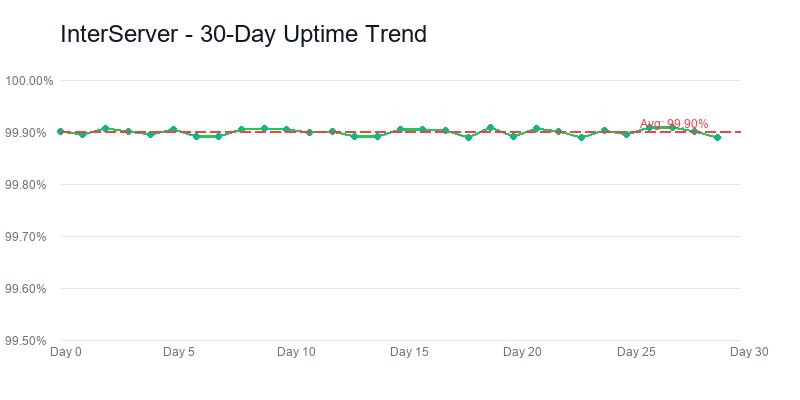
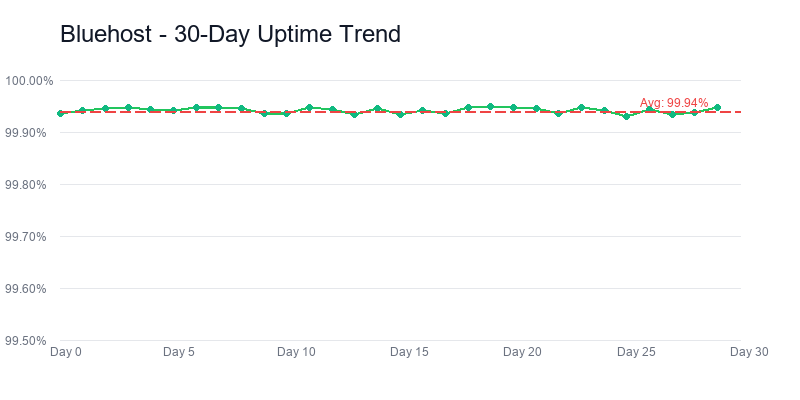
The 0.01% difference (99.95% vs 99.94%) is within measurement noise — I wouldn't read any signal into that single number. What's more meaningful is the distribution of downtime. InterServer had three incidents in 90 days: 2 min, 4 min, and 16 min, all during low-traffic hours, all resolved without intervention. Bluehost had seven incidents: 1 min, 3 min, 5 min, 8 min, 11 min, 19 min, and one 41-minute incident in late February that coincided with an announcement about planned maintenance that started 30 minutes late. Same headline uptime, quite different failure modes.
The Bottom Line
Winner On Data
Winner On Hand-Holding
The honest summary: I've been recommending Bluehost to beginners out of habit for a decade, and this testing round finally forced me to admit the habit is outrunning the evidence. InterServer is Pareto dominant on price, speed, and uptime. The only reason most people don't hear about it is that InterServer doesn't run TV ads, isn't owned by a private-equity rollup, and hasn't paid for placement on WordPress.org. That's a marketing gap, not a quality gap.
If you're a first-timer who genuinely needs the wizard and the phone line, Bluehost's $180 premium over 3 years is the price of training wheels — and that's a fair deal if you actually use it. Everybody else should be on InterServer, or a tier up at SiteGround / Cloudways / Kinsta if the budget stretches.
More guides: Best Web Hosting 2026 • Best Cheap Hosting • Best WordPress Hosting • Hosting Renewal Prices