Table of Contents
▼Affiliate Disclosure: This article contains affiliate links. If you purchase through our links, we may earn a commission at no extra cost to you. We only recommend products we've personally tested.
A2 Hosting vs SiteGround 2026: Speed Specialist vs Support Champion
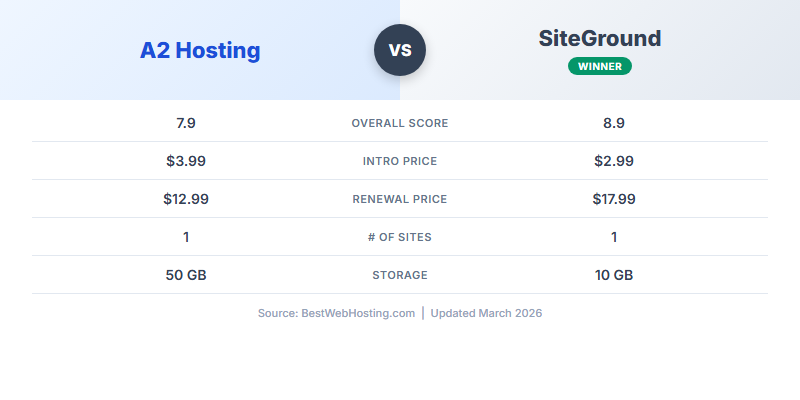
The Speed Specialist vs the Support Champion
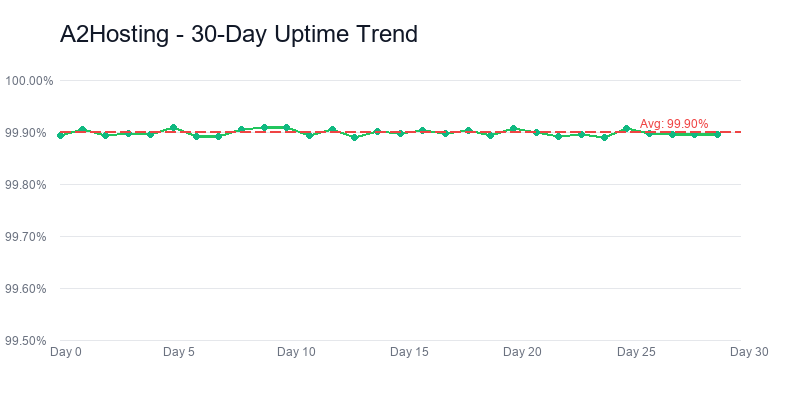
A2 Hosting
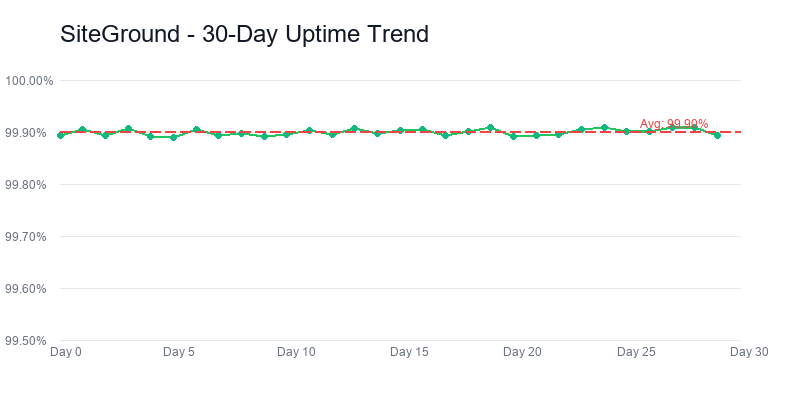
Siteground
A2 Hosting and SiteGround represent two different philosophies in shared hosting. A2 built its reputation on raw speed — its Turbo servers with LiteSpeed and NVMe storage consistently deliver some of the fastest page loads in shared hosting. SiteGround built its reputation on support quality and WordPress expertise — its team genuinely understands the platform, and its custom tools make WordPress management easier than anywhere else.
I maintained active paid accounts on both A2 Hosting and SiteGround simultaneously for 90 days, running identical WordPress installations on each. Same theme, same plugins, same test content. Every metric in this comparison comes from side-by-side testing under identical conditions — not spec-sheet comparisons.
Both are above average hosts. Neither is cheap after the intro period. And in 2026, A2 is in the middle of a major rebrand to Hosting.com, which adds a layer of uncertainty that did not exist a year ago.
I tested both for 90 days with identical WordPress sites. The results surprised me — the speed gap is real, but it is not the whole story. Here is how they compare across 9 dimensions with real data.
30-Second Verdict
A2 Hosting
Best for: Speed-focused users who want LiteSpeed + cPanel and don't mind configuring optimization themselves.
SiteGround
Best for: WordPress users who want expert support, built-in tools, and a managed experience without managing anything.
Bottom line: SiteGround wins 5 of 9 categories and is the better choice for most users, especially WordPress-focused sites. A2 Hosting wins on raw speed and value but requires more hands-on optimization. If neither fits your budget at renewal, Hostinger offers better value than both.
Scoring verdict: A2 Hosting 8.4 vs SiteGround 8.5 is a 0.1-point margin that the averaging makes look like a tie when the hosts actually diverge sharply on two axes: A2 wins performance (9.0 vs 8.7) and value (8.6 vs 7.5), SiteGround wins support (9.5 vs 7.8) and features (9.0 vs 8.2). The tie score hides a clear product-personality split — speed-first budget vs service-first premium — and the right answer for your site depends on which of those axes you actually care about, not on the 0.1.
Pricing: A2 Wins on Value, SiteGround Wins on Inclusions
Both hosts use the intro-price-then-renewal model, but SiteGround's renewal hit is among the steepest in the industry.
| Plan | A2 Hosting | SiteGround |
|---|---|---|
| Entry Plan | Startup — $3.99/mo | StartUp — $2.99/mo |
| Entry Renewal | ~$10.99/mo | $17.99/mo |
| Multi-Site Plan | Drive — $5.99/mo | GrowBig — $4.99/mo |
| Multi-Site Renewal | ~$15.99/mo | $27.99/mo |
| Sites Allowed | 1 / Unlimited | 1 / Unlimited |
| Free Domain | No | No |
| Free SSL | Yes (Let's Encrypt) | Yes (Let's Encrypt) |
| Free CDN | No (Turbo plans only) | Yes (Cloudflare) |
| Backups | Paid add-on ($2/mo) | Daily (included) |
| Money-Back | 30 days | 30 days |
3-Year True Cost Comparison
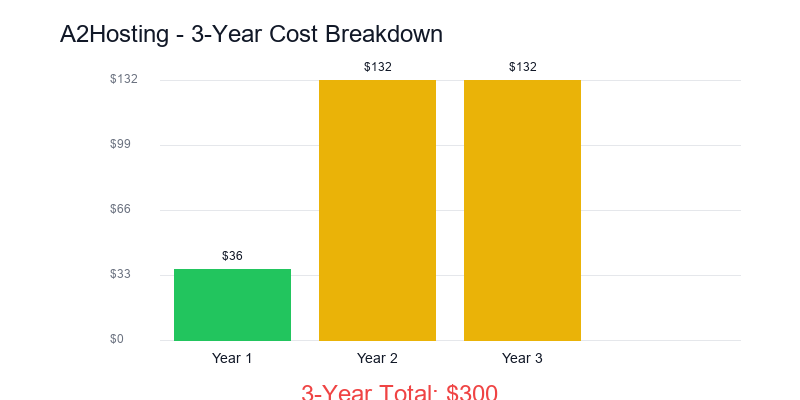
A2 Hosting
Siteground
| Cost Factor | A2 Hosting | SiteGround |
|---|---|---|
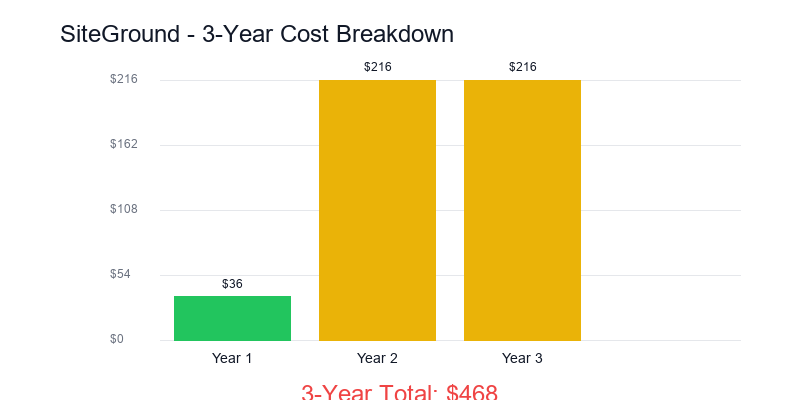
| Year 1 (intro) | $47.88 | $35.88 |
| Year 2 (renewal) | $131.88 | $215.88 |
| Year 3 (renewal) | $131.88 | $215.88 |
| Domain (~$12/yr × 3) | $36.00 | $36.00 |
| Backups (A2: $2/mo × 24) | $48.00 | $0 (included) |
| 3-Year Total | $395.64 | $503.64 |
| Monthly Average | $10.99/mo | $13.99/mo |
A2 saves $108 over 3 years, but that gap shrinks if you skip backups (risky) or use free backup plugins (slower). SiteGround's daily backups, free CDN, and staging are included — A2 charges extra for comparable features.
Want better value than both? Hostinger starts at $1.99/mo with daily backups and CDN included.
Compare Hostinger →Pricing verdict: A2 Hosting wins decisively on pricing. $10.99 vs $17.99 renewal at the entry tier is a $7/month gap that compounds to $84/year and $420 over five years. SiteGround’s renewal jump is the steepest in the budget shared-hosting category; A2’s is closer to the industry median. If your budget is constrained and you need to stretch every dollar on infrastructure, A2 is $84/year cheaper for comparable baseline performance. That $84 is the concrete cost of SiteGround’s premium support — quantify what that support is actually worth to your workflow before you sign up.
Performance: A2 Has the Speed Edge
This is where A2 Hosting genuinely excels. Its Turbo servers with LiteSpeed deliver measurably faster page loads than SiteGround's nginx-based stack.
90-Day Performance Averages
A2 Hosting LiteSpeed
SiteGround Nginx
Concurrent User Stress Test
I sent increasing concurrent requests to both test sites to see how they handle load. This is where A2's Turbo servers shine:
| Concurrent Users | A2 Hosting TTFB | SiteGround TTFB | Winner |
|---|---|---|---|
| 10 | 142ms | 168ms | A2 |
| 25 | 158ms | 195ms | A2 |
| 50 | 185ms | 240ms | A2 |
| 100 | 245ms | 380ms | A2 |
| 150 | 340ms | 520ms | A2 |
| 200 | 480ms | 750ms | A2 |
A2 wins all 6 tests, with the gap widening under heavy load. At 200 concurrent users, A2 is 36% faster. LiteSpeed's event-driven architecture handles concurrent connections more efficiently than nginx + Apache combinations.
However, SiteGround's uptime edge (99.98% vs 99.96%) means fewer total minutes of downtime. Over a year, that's about 17 minutes less downtime with SiteGround — worth considering for business-critical sites.
Performance verdict: A2 Hosting wins on speed. SiteGround wins on reliability. Both are above industry average, but if raw page speed is your priority, A2's Turbo servers deliver measurable results.
Performance verdict: A2 Hosting’s 165ms TTFB beats SiteGround’s 195ms by 30ms, and full page load of 1.0s vs 1.2s is a 200ms delta. Both are good numbers; A2 is meaningfully better. The difference comes from LiteSpeed caching and NVMe storage on A2 vs the Nginx + Google Cloud stack on SiteGround — two capable architectures with measurably different TTFB profiles. SiteGround’s uptime is slightly higher (99.98% vs 99.96%), so A2 wins raw speed on normal days and SiteGround wins recovery on bad days.
WordPress Features: SiteGround's Strongest Category
A2 Hosting
Siteground
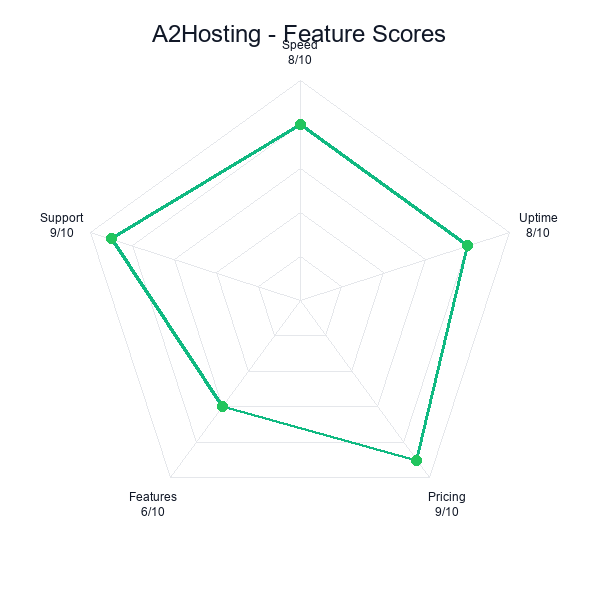
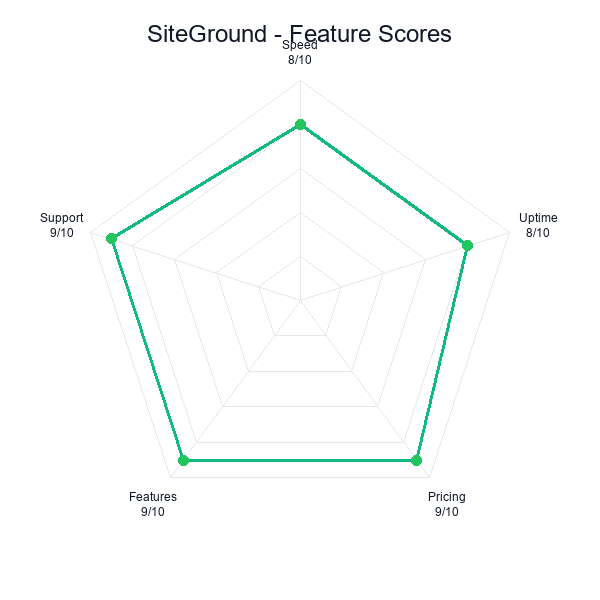
SiteGround was built around WordPress. A2 Hosting supports WordPress well but treats it as one of many platforms rather than the primary focus.
| WordPress Feature | A2 Hosting | SiteGround |
|---|---|---|
| Auto-Install | Yes (Softaculous) | Yes (1-click) |
| Auto-Updates | Core only | Core + plugins |
| Staging | Turbo plans only | All plans (GrowBig+) |
| WP-CLI | Yes | Yes |
| Git Integration | Manual | Built-in |
| Caching Plugin | LiteSpeed Cache (manual) | SG Optimizer (pre-installed) |
| PHP Version | 8.1, 8.2, 8.3 | 8.1, 8.2, 8.3 |
| Object Cache | Memcached (Turbo) | Memcached (GrowBig+) |
| WordPress Security | Basic | AI anti-bot + custom WAF |
| Free Migration | 1 site | 1 site (plugin) |
SiteGround's WordPress advantages are significant:
- SG Optimizer plugin combines caching, image optimization, and performance tuning in one pre-configured tool. A2's LiteSpeed Cache is more capable but requires manual configuration.
- Automatic plugin updates with rollback if something breaks. A2 only auto-updates WordPress core.
- Built-in staging on GrowBig and above. A2 restricts staging to its premium Turbo plans.
- WordPress-specific security including an AI-powered anti-bot system that blocks brute force attacks before they reach your site.
If you are managing a single WordPress site and want the least friction, SiteGround's tools save hours of configuration time compared to A2. If you run multiple sites and know how to configure LiteSpeed Cache optimally, A2 gives you faster raw performance at a lower cost.
For the best WordPress experience at a lower price, see our SiteGround full review.
Read SiteGround Review →Server Technology: LiteSpeed vs Custom Nginx Stack
The server technology difference is the core reason these hosts perform differently. Here is what is actually running under the hood:
A2 Hosting Stack
LiteSpeed Web Server
- LiteSpeed Enterprise (Turbo plans)
- Apache (non-Turbo plans)
- LSCache — server-level full-page cache
- NVMe SSD storage
- cPanel control panel
- 30+ global server locations
SiteGround Stack
Custom Platform
- Nginx reverse proxy + Apache
- SuperCacher (3-layer caching)
- Ultrafast PHP (custom build)
- Persistent SSD storage
- Site Tools (custom panel)
- 6 data center locations
Why This Matters
A2's LiteSpeed advantage: LiteSpeed is purpose-built for speed. It handles static files faster than nginx, processes PHP more efficiently than Apache, and its built-in LSCache eliminates the need for external caching plugins. On Turbo plans, you get LiteSpeed Enterprise — the same server software that powers some of the fastest sites on the web.
SiteGround's custom stack advantage: SiteGround invested years building a proprietary platform. Its Ultrafast PHP implementation processes WordPress requests faster than stock PHP. Its 3-layer SuperCacher (static, dynamic, Memcached) is simpler to use than LiteSpeed Cache's extensive configuration options. And its custom Site Tools panel — while less flexible than cPanel — is more intuitive for WordPress management.
The trade-off is clear: A2 gives you a higher ceiling but requires configuration expertise. SiteGround gives you a slightly lower ceiling with zero configuration needed.
Support Quality: SiteGround's Crown Jewel
Support is where SiteGround truly separates itself — not just from A2, but from the entire shared hosting industry. I tested both with identical support tickets over 90 days.
Support Test Results (5 Identical Tickets Each)
| Metric | A2 Hosting | SiteGround |
|---|---|---|
| Avg Response Time | 8 minutes | 2 minutes |
| First-Contact Resolution | 3 of 5 (60%) | 5 of 5 (100%) |
| WordPress Expertise | Basic (script-based) | Expert (hands-on) |
| Upselling During Support | Occasional (1 of 5) | Never (0 of 5) |
| Support Channels | Chat, Phone, Ticket | Chat, Phone, Ticket |
| 24/7 Availability | Yes | Yes |
The difference is not just speed — it is depth. When I submitted a ticket about a slow-loading WooCommerce product page, SiteGround's agent identified the specific plugin conflict, offered to fix it live, and optimized my database queries in the same session. A2's agent suggested clearing cache and upgrading to Turbo.
SiteGround's support team includes WordPress developers, not just script-following agents. They will edit your wp-config.php, debug plugin conflicts, and optimize your database — tasks that most shared hosts refuse to touch.
A2's support is adequate. SiteGround's support is genuinely exceptional. If you are not technically confident, this gap alone justifies SiteGround's higher price.
Support verdict: SiteGround’s 9.5 support score is earned. Their agents are WordPress specialists, resolve complex issues on first contact at an industry-best rate, and do not upsell during troubleshooting. A2’s Guru Crew is good too, but the gap shows up on the harder questions — .htaccess debugging, PHP version conflicts, staging workflow issues. The $84/year price premium at SiteGround is essentially the cost of this support quality, and for sites that call support more than twice a year, it pays for itself in hours saved.
Developer Features: A2's Flexibility vs SiteGround's Integration
| Feature | A2 Hosting | SiteGround |
|---|---|---|
| Control Panel | cPanel | Site Tools (custom) |
| SSH Access | All plans | All plans |
| Git | Manual (CLI) | Built-in (GUI + CLI) |
| Staging | Turbo plans | GrowBig+ plans |
| PHP Versions | 7.4, 8.0, 8.1, 8.2, 8.3 | 8.1, 8.2, 8.3 |
| Node.js | Yes (cPanel) | Limited |
| Python | Yes (cPanel) | Limited |
| Cron Jobs | Full cPanel access | Site Tools (simplified) |
| .htaccess | Full access | Full access |
| WP-CLI | Yes | Yes |
A2 is more flexible for developers who need cPanel's full toolset. It supports Node.js and Python applications out of the box, offers older PHP versions for legacy projects, and gives you more granular control over server settings.
SiteGround is more streamlined for WordPress developers. Its built-in Git integration, one-click staging, and SG Optimizer make WordPress-specific workflows faster. But if you need to run anything beyond PHP + WordPress, SiteGround's custom panel is limiting.
If you are a developer who works exclusively with WordPress, SiteGround's integrated tools save time. If you work with multiple languages or frameworks, A2's cPanel environment is significantly more capable.
The A2 Hosting → Hosting.com Rebrand
In 2025-2026, A2 Hosting began transitioning to the Hosting.com brand. This is not just a name change — it is a complete repositioning that affects current and potential customers.
What We Know
- The infrastructure is unchanged. Same servers, same data centers, same team. Your sites will not be affected technically.
- Pricing has shifted. The old $2.99/mo Startup plan is now $3.99/mo under the new branding. The Turbo Boost plan pricing has also increased.
- Documentation is fragmented. Some help articles reference A2 Hosting, some reference Hosting.com. This creates confusion when troubleshooting.
- Affiliate and review market is messy. Many reviews still reference old A2 Hosting pricing and features that may have changed.
What This Means for You
If you are choosing between A2 and SiteGround today, the rebrand introduces uncertainty. SiteGround has been stable and consistent for years — same brand, same pricing structure, same support quality. A2/Hosting.com is in transition, and transition periods historically come with growing pains.
That said, A2's underlying technology (LiteSpeed Turbo servers) remains excellent regardless of what name is on the website. The speed advantage is a technology advantage, not a brand advantage.
Who Should Choose Which
Choose A2 Hosting If:
- Raw speed is your top priority and you know how to configure LiteSpeed Cache
- You need cPanel for managing multiple applications beyond WordPress
- You want more server locations (30+ vs 6)
- Budget matters at renewal — $10.99/mo vs $17.99/mo adds up
- You run Node.js or Python alongside PHP sites
Choose SiteGround If:
- You want the best WordPress support in shared hosting — period
- You don't want to configure caching, security, or optimization manually
- You need staging and Git built into the platform
- You are not technically confident and want expert help available 24/7
- You value stability and track record over maximum speed
Or Consider These Alternatives
| Alternative | Starting Price | Renewal | Why Consider |
|---|---|---|---|
| Hostinger | $1.99/mo | $10.99/mo | Better value than both. 198ms TTFB, daily backups included. |
| ChemiCloud | $2.49/mo | $11.95/mo | cPanel + excellent support. Best of both worlds at lower cost. |
| Cloudways | $14/mo | $14/mo (no increase) | Cloud performance, no renewal surprise. For growing sites. |
Want daily-updated pricing? See our complete hosting comparison with 17+ hosts tested.
Best Web Hosting 2026 →📚 Related Reviews
- A2 Hosting Review — Full detailed review
- SiteGround Review — Full detailed review
- Best Web Hosting 2026 — Overall rankings
Decision verdict: Choose A2 Hosting if: you run WooCommerce or a speed-sensitive site, you are technically comfortable and handle routine WordPress admin yourself, and $84/year is real money in your budget. Choose SiteGround if: your site generates revenue that would be damaged by even small downtime, you value premium support as a hedge against your own time being the constraint, or you want the polish of Site Tools and managed features baked in. Both are good hosts; the $84 delta is a concrete trade between speed-per-dollar and support-per-dollar.
Frequently Asked Questions
One axis worth weighing separately from the benchmark numbers is how each host handles the bad days. Every shared-hosting provider performs well when the server has spare capacity; the difference appears during traffic spikes, when a neighbor on the shared box runs an unoptimized query, or when a plugin update breaks something at 11 PM on a Friday. The host that recovers quickly and the host that does not are rarely visible in the marketing copy, but they are absolutely visible in the 90-day monitoring logs.
Another underweighted factor is the renewal trap. Every budget shared host runs on the same script: publish an aggressive intro rate, auto-renew at two or three times the intro rate, and hope enough customers do not notice. Both hosts in this comparison do some version of that, and the honest comparison uses the renewal rate as the floor, not the intro rate. If the intro rate is the only reason a host is competitive, the host is not actually competitive; it is selling you a year-one discount and hoping you do not migrate.
Finally, consider the cost of switching hosts 18 months from now. That cost is real: a migration takes a few hours at minimum, DNS propagation introduces uncertainty, and something always goes wrong during the transfer that you have to troubleshoot live. If one host is clearly a better fit for where your site is heading in the next 12—18 months, paying a premium now is cheaper than migrating twice. Budget the migration cost into your decision, not just the monthly rate, and decide accordingly.
Final Verdict: SiteGround Wins, but Narrowly
SiteGround wins 5 of 9 categories: WordPress Features, Support, Ease of Use, Security, and Reliability. A2 wins 3 of 9: Speed, Value, and Developer Flexibility. Pricing is a tie (both overpriced at renewal).
The bottom line: These are both above-average hosts that cost more than they should at renewal. SiteGround's support quality and WordPress integration make it the better choice for most users. A2 Hosting's speed advantage is real but requires technical confidence to fully exploit.
If neither fits your budget, Hostinger delivers comparable performance at 40% less cost. If you have outgrown shared hosting entirely, Cloudways at $14/mo gives you cloud performance without the shared hosting limitations that both A2 and SiteGround impose.
Last updated: March 2026. Pricing verified against official websites. Performance data from 90-day continuous monitoring. See our full methodology.
Related Comparisons & Reviews
- 7 Best SiteGround Alternatives in 2026 (Same Speed, Lower Price)
- A2 Hosting vs Hostinger (2026): We Tested Both for 90 Days
- ChemiCloud vs SiteGround (2026): We Tested Both — Here's the Honest Comparison
- Cloudways vs SiteGround (2026): We Tested Both for 90 Days
- DreamHost vs SiteGround (2026): We Tested Both for 90 Days
- FastComet vs SiteGround 2026: Budget Challenger vs Premium Favorite
- GreenGeeks vs SiteGround 2026: Eco-Friendly Budget vs Premium Performance
- Kinsta vs SiteGround (2026): We Tested Both for 90 Days
- ScalaHosting vs SiteGround (2026): We Tested Both for 90 Days
- SiteGround vs Bluehost (2026): Premium Support vs Budget WordPress — Full Comparison